# Contribute
Source: https://agentcommunicationprotocol.dev/about/contribute
Help shape the future of agent interoperability
Thank you for your interest in contributing to the Agent Communication Protocol (ACP). This guide will show you **how to get involved**, the types of contributions we’re looking for, and where to find support.
## Share Use Cases
One of the best ways to help ACP evolve is by sharing practical use cases. These examples keep development grounded in real-world needs and highlight where multi-agent communication can add value.
1. Start a [GitHub Discussion](https://github.com/i-am-bee/acp/discussions).
2. Use the following template to describe your scenario:
```md
# Title
Use Case – [short summary]
## Problem
[Describe the context and challenge you're facing.]
## Solution Idea
[Explain how ACP could be part of the solution.]
## Open Questions
[List any questions or feedback you’re looking for.]
```
3. Engage with feedback from the community
## Implement Examples
Code examples are a powerful way to demonstrate ACP in action. They also help others understand how to use the protocol in their own projects.
1. Fork the [ACP repository](https://github.com/i-am-bee/acp)
2. Use the Python SDK to build your example in the [examples directory](https://github.com/i-am-bee/acp/tree/main/examples/python)
3. Submit a [pull request](https://github.com/i-am-bee/acp/pulls) with your implementation
## Report Issues with ACP
If you run into issues while using ACP, whether something is unclear, broken, or missing, we encourage you to report it.
* Open a [GitHub issue](https://github.com/i-am-bee/acp/issues)
* Include specific details:
* The relevant part of the spec
* What didn’t work or needs clarity
* Suggestions for improvement
* Any code examples that demonstrate the issue
## Propose Enhancements to ACP
If you have ideas to improve or expand the protocol, we would love to hear them.
1. Start a [GitHub Discussion](https://github.com/i-am-bee/acp/discussions).
2. Use this template to focus the discussion:
```md
# Title
Enhancement - [short summary]
## Motivation
Why this matters for ACP.
## Specification
Sketch of API, data model, or architecture.
## Implementation Plan
Who’s championing it & how you’d tackle it.
## Drawbacks / Open Questions
Points for the community to weigh in on.
```
3. Engage with feedback from the community
## Why Contribute?
Contributing to ACP helps shape the future of multi-agent communication and supports the growth of a more interoperable ecosystem. Your contributions directly impact the development and refinement of the protocol, benefiting everyone in the community.
* **Set the standard:** Your work helps define how agents will communicate across different platforms, contributing to the creation of a widely adopted protocol.
* **Foster innovation:** By sharing code, feedback, or use cases, you're helping to build tools and practices that improve development within the ACP ecosystem.
* **Move the protocol forward:** Whether you’re solving technical challenges, refining documentation, or suggesting improvements, your contributions help drive the protocol’s evolution and support broader adoption.
Every contribution, big or small, plays a key role in advancing ACP and making multi-agent communication more effective and accessible.
## Questions?
Have questions or not sure where to start? Ask a question on [GitHub Discussions](https://github.com/i-am-bee/acp/discussions/categories/q-a).
We look forward to your contributions and are excited to collaborate with you!
# MCP and A2A
Source: https://agentcommunicationprotocol.dev/about/mcp-and-a2a
How does ACP compare to other AI protocols
## Model Context Protocol
[**Model Context Protocol (MCP**](https://modelcontextprotocol.io/introduction)**)** is a popular open standard from Anthropic that provides AI **models** (usually LLMs) with **context**: resources, tools, etc. MCP operates effectively within the bounds of a "single agent", since it enables the connection between the LLM and its tools/resources.
On the other hand, Agent Communication Protocol (ACP) is a protocol that enables **communication** between **agents**.
MCP and ACP work together to build powerful agentic systems, as shown below:
```mermaid
graph TD
subgraph "Agent 1"
A1[model] <--> |MCP| B1[tool]
A1 <--> |MCP| C1[resource]
A1 <--> |MCP| D1[...]
end
subgraph "Agent 2"
A2[model] <--> |MCP| B2[tool]
A2 <--> |MCP| C2[resource]
A2 <--> |MCP| D2[...]
end
A1 <--> |ACP| A2
class Agent1,Agent2 agent;
class A1,A2 model;
class B1,B2,C1,C2,D1,D2 mcp;
```
## Agent2Agent Protocol
The Agent Communication Protocol (ACP) launched by IBM in March 2025 and [Agent2Agent Protocol (A2A)](https://github.com/google/A2A), launched by Google in April 2025, both aim to create a standard interface for agent-to-agent communication.
Advantages of ACP include:
* **Open Governance**: Managed through the Linux Foundation.
* **Co-developed with BeeAI**: An open platform to manage the agent lifecycle, including installation, running, registration, and sharing of agents.
* **REST-based Communication**: Enables lightweight, runtime-free agent invocation and scalable system integration.
* **Offline Agent Discovery**: Agents are packaged with details at build time. Note: BeeAI provides an open registry implementation.
* **Message Structure**: The MIME-type-based message structure in ACP is designed to be extensible and flexible, as opposed to the pre-defined types.
* **Agent Support**: Compatible with any agent, from small, stateless, serverless utility agents to long-running, stateful conversational agents.
* **Native SDK**: Allows users to wrap an agent and create a server, provides tooling for session management, and handles agent state management.
# Mission & Team
Source: https://agentcommunicationprotocol.dev/about/mission-and-team
The why, who, and how of ACP
## Mission
Our mission is to define a standard interface enabling interaction of AI agents across different frameworks and technology stacks. We envision a future where local, remote, and open-source agents can seamlessly interoperate and communicate across any machine or platform.
## Team
We are grateful for the efforts of our [initial contributors](https://github.com/i-am-bee/acp/graphs/contributors), who have played a vital role in getting ACP of the ground. As we continue to grow and evolve, we invite others to join our vibrant community and contribute to our project’s ongoing development.

## Governance
As part of the [Linux Foundation AI & Data](https://lfaidata.foundation/), ACP is committed to upholding the principles of open, collaborative, and community-driven practices. Our strategic and operational decisions are made transparently, guided by open governance principles.
Jump into our [discussions](https://github.com/i-am-bee/acp/discussions) to get involved today or visit our [community repo](https://github.com/i-am-bee/community) to learn more about our governance model. We look forward to welcoming new contributors and collaborators as we build and grow together!
# What's Next
Source: https://agentcommunicationprotocol.dev/about/whats-next
Areas of exploration for future ACP development
As the **Agent Communication Protocol (ACP)** evolves, we’re actively exploring new directions. Below are the themes and questions guiding our current exploration into where the protocol might go next.
## Identity Federation
How might ACP evolve to work more seamlessly with various authentication systems, potentially simplifying trust and verification across diverse networks?
* What are some potential ways ACP could integrate with existing identity systems?
* How might we balance security with ease of integration?
## Access Delegation
How might we delegate permissions to agents, enabling richer interactions while maintaining user control and security?
* How granular should permission models be for different agent capabilities?
* What mechanisms would allow temporary access grants with clear expiration?
* What are the potential risks associated with access delegation, and how can we address them effectively?
## Multi-Registry Support
What if ACP could support multiple registries, allowing for decentralized agent discovery and management across different networks?
* How would discovery work across independent registry systems?
* What synchronization mechanisms would support distributed agent ecosystems?
## Agent Sharing
What would it take to create smoother methods for sharing and reusing agents within teams and across organizations, promoting collaboration and reducing redundancy?
* How could we simplify the process of sharing agents, making it easier to reuse across teams and organizations?
* What security considerations would need to be addressed to safely share agents across different entities?
* How might sharing agents across organizations help foster collaboration, and what challenges could arise in doing so?
## Deployments
Could new tools and templates make it easier to deploy and manage agents, simplifying distribution across various environments?
* What tools or templates could streamline agent deployment, especially in different environments like cloud or on-premises?
* What reference implementations would help teams adopt ACP more easily?
## Evaluation and Monitoring
How can we better track and monitor agent performance, reliability, and compliance, using enhanced diagnostics and monitoring tools?
* What metrics would be most meaningful for evaluating agent effectiveness?
* What patterns would help identify problematic agent behaviors early?
## Governance
How might new governance frameworks help manage policies, compliance, and agent behaviors, ensuring that ACP ecosystems stay secure, ethical, and transparent?
* What kinds of governance models could help manage a decentralized ecosystem of ACP agents?
* What mechanisms would help ensure compliance with regulatory requirements?
## AI Gateway Integration
What opportunities exist to integrate ACP with AI gateways, unlocking the potential for advanced AI-driven interactions and enhancing agent capabilities?
* How could AI gateways improve ACP-based agent interactions and decision-making processes?
* How could integrating AI-driven capabilities expand ACP’s scalability and flexibility?
* What challenges might emerge when integrating ACP with AI gateways, and what are potential solutions?
***
We welcome your thoughts and contributions on these topics. Join the conversation in our [community forums](/about/contribute) to help shape the future of agent communication.
# Agent Discovery
Source: https://agentcommunicationprotocol.dev/core-concepts/agent-discovery
Discover available agents and their capabilities
Agent discovery is the process by which ACP clients locate and connect to available agents. The [Agent Manifest](/core-concepts/agent-manifest) enables clients to find the appropriate ACP server and retrieve the necessary metadata to establish communication.
The discovery process provides clients with agent name, description, capabilities, operational status, and additional metadata.
Agent discovery can occur through these primary methods:
* **Basic Discovery**: Query running ACP servers directly (online)
* **Open Discovery**: Use public manifest files at well-known URLs (online)
* **Registry-Based Discovery**: Use a centralized registry (online or offline)
* **Embedded Discovery**: Find agents using embedded metadata or manifest files (offline)
## Basic Discovery
Query a running ACP server to discover its agents:
```bash
curl http://localhost:8000/agents
```
```python
import asyncio
from acp_sdk.client import Client
async def main():
client = Client(base_url="http://localhost:8000")
async for agent in client.agents():
print(agent.name, agent.description)
asyncio.run(main())
```
Filtering and sorting are on our roadmap. Help us shape priorities by sharing your thoughts via [community feedback](/about/contribute).
## Open Discovery
Open discovery allows [Agent Manifest](/core-concepts/agent-manifest) to be made publicly accessible through a standardized manifest file. This lets apps, websites, and tools discover agent capabilities by knowing only the agent's domain.
Publish your agent metadata using a YAML file at a well-known location:
```bash
https://your-domain.com/.well-known/agent.yml
```
**Important**: The Agent Manifest specification only describes agent capabilities, not deployment or consumption instructions.
* **Managed agents** (packaged for deployment) need standardized build and deployment instructions
* **Unmanaged agents** (already running services) need metadata on how to access and consume the service
These deployment details aren't part of the official ACP specification yet. We're exploring options for standardizing both types using containers, `uvx`, and `npx` for simpler distribution.
## Registry-Based Discovery
Registry-based discovery provides a centralized view of agents across multiple ACP servers, making it easier to manage agents in large deployments. Registries can work online (live queries) or offline (cached/synced databases).
Benefits:
* Centralized agent listings
* Scalable management across multiple servers
* Simplified search and discovery
While not yet part of the official ACP spec, this feature is implemented in the [BeeAI Platform](https://beeai.dev). We're gauging community interest in making this part of the core ACP specification. Share your feedback on our Contribute page.
## Embedded Discovery
Offline discovery lets you find agents without network connectivity by embedding agent metadata directly into distribution packages (like container image labels or bundled metadata files).
By embedding metadata during build time, the [Agent Manifest](/core-concepts/agent-manifest) remains synchronized with the agent's actual implementation. This approach:
* Prevents mismatches between advertised capabilities and actual behavior
* Provides value in secure, disconnected, or automated deployment environments
* Simplifies distribution and deployment
We recommend embedding Agent Manifest metadata directly into container images during builds. The [BeeAI Platform](https://beeai.dev) stores standardized metadata in container image labels, which:
* Integrates with CI/CD pipelines
* Ensures metadata consistency throughout the deployment lifecycle
* Simplifies offline agent discovery
To participate in ongoing discussions about manifest standardization and best practices, visit our [Contribute](/about/contribute) page or join these existing discussions:
* [Agent Manifest File Format #427](https://github.com/i-am-bee/beeai-platform/discussions/427)
* [Manifest-Based Agent Offline Discoverability #344](https://github.com/i-am-bee/beeai-platform/discussions/344)
# Agent Manifest
Source: https://agentcommunicationprotocol.dev/core-concepts/agent-manifest
Structure and usage of the Agent Manifest
The **Agent Manifest** describes essential properties of an agent, including its identity, capabilities, metadata, and runtime status. It also plays an important role in discoverability and how the ACP server advertises agents to clients.
During implementation, if the agent name and description are not provided, the agent's function name and docstring will be used as defaults (as they are required).
## Example SDK Implementation
The `@server.agent` decorator is used to configure an agent's metadata when registering it with an ACP server:
```python agent.py
@server.agent(
name="data-analyzer",
description="Analyzes datasets and generates insights")
async def DataAnalyzerAgent():
"""String that is used as default description if not explicitly provided in the @server.agent """
# Agent implementation here
yield str(response.object)
```
## Parameters
## Content Types
The `input_content_types` and `output_content_types` fields specify the MIME types that an agent can handle. Wildcards are supported.
### Common Content Types
* **`*/*`**: Any content
* **`image/*`**: Any image
* **`text/plain`**: Plain text content
* **`application/json`**: JSON structured data
* **`image/png`**: PNG image files
* **`image/jpeg`**: JPEG image files
* **`application/pdf`**: PDF documents
### Example Usage
```python
@server.agent(
name="image-analyzer",
description="Analyzes images and provides text descriptions",
input_content_types=["image/png", "image/jpeg"],
output_content_types=["text/plain", "application/json"]
)
async def ImageAnalyzerAgent(input: list[Message], context: Context):
# Process image inputs and return text/json outputs
pass
```
## Default Values
If `input_content_types` and `output_content_types` are not specified in the decorator, they default to `["*/*"]`:
```python
@server.agent() # Uses default ["*/*"] for both input and output
async def SimpleTextAgent(input: list[Message], context: Context):
# Agent implementation
pass
```
# Agent Run Lifecycle
Source: https://agentcommunicationprotocol.dev/core-concepts/agent-run-lifecycle
Understand the Agent Run lifecycle
The Agent Communication Protocol (ACP) defines a structured lifecycle for individual agent runs, guiding them from creation to completion.
Understanding this lifecycle is key to effectively managing agent executions and handling the different states that runs transition through, while also allowing the agent execution to be paused to collect additional input via `Await`.
## Agent Run
Individual agent executions are managed through "Agent Runs". Each run follows a specific state machine that determines how it progresses from creation to completion.
When a run is first created, it starts in the `created` state. This initial state indicates that the run request has been accepted but processing hasn't begun yet. As soon as an agent picks up the work, it immediately transitions to the `in-progress` state.
The run can then result in a several outcomes:
1. **Successful Completion**: The agent finishes its task successfully and transitions to the `completed` state with its final output.
2. **Failed Completion**: The agent encounters an error or fails to complete its task, transitioning to the `failed` state with error details.
3. **Cancelled Execution**: The client can request cancellation of a run using the `run/{run_id}/cancel` endpoint, which transitions the run to the `cancelling` state. Once the agent confirms the cancellation, the run moves to the terminal `cancelled` state. This two-step process ensures graceful termination of agent execution.
4. **Await-based Pause**: Using the Await mechanism, agents can temporarily pause execution in the `awaiting` state to request additional information or actions from the client.
### Agent Run Await
Await is a core concept in ACP that enables pausing of agent execution to allow the client to provide additional input.
When an agent requires external data to continue its work, it can pause execution and wait for the client to supply the necessary information. This enables interactive workflows where agents can, for example:
* Request clarification or additional context
* Ask for user confirmation
* Trigger actions in other systems
The paused execution then result in these outcomes:
1. **Resumed Execution**: Once the requested information is provided by the client via the resume endpoint, the agent transitions back to `in-progress` and continues execution.
2. **Cancelled Execution**: The Await state can also be interrupted by cancellation.
3. **Timeout**: If the agent remains in the `awaiting` state for too long without receiving a response, it will transition to the `failed` state with a timeout error.
### Run States
Agent Runs transition through the following states:
```mermaid
stateDiagram-v2
in_progress: in-progress
[*] --> created
created --> in_progress : Start work
in_progress --> completed : Successfully done
in_progress --> awaiting : Waiting on input
in_progress --> cancelling : Cancel requested
awaiting --> failed : Timeout or error
in_progress --> failed : Error encountered
awaiting --> in_progress : Input received
awaiting --> cancelling : Cancel while waiting
cancelling --> cancelled : Cancel confirmed
cancelled --> [*]
completed --> [*]
failed --> [*]
```
### State Descriptions
* **`created`** - The run has been initiated but not yet started processing
* **`in-progress`** - The agent is actively processing the request
* **`awaiting`** - The agent has paused execution and is waiting for additional input
* **`completed`** - The agent has successfully finished processing
* **`cancelling`** - A cancellation request has been received and is being processed
* **`cancelled`** - The run has been successfully cancelled
* **`failed`** - The run encountered an error and cannot continue
## Managing Agent Runs
ACP provides specific API endpoints for managing the run lifecycle:
| **Method** | **Endpoint** | **Description** |
| ---------- | ----------------------- | ------------------------------------------------------------------------------------------------------------------------------------------------------------------ |
| `POST` | `/runs` | Initiates a new agent run. Requires `agent_name`, `input`. Optional: `session_id`, `mode` (`sync`, `async`, `stream`). Returns the initial `Run` object or stream. |
| `GET` | `/runs/{run_id}` | Retrieves the current state and details of a specific agent run. |
| `POST` | `/runs/{run_id}` | Resumes an agent run in the `awaiting` state. Requires `await_resume` data. Optional: `mode` for the response. |
| `POST` | `/runs/{run_id}/cancel` | Requests cancellation of an ongoing agent run. Returns `202 Accepted` if cancellation is initiated. |
## Execution Patterns
The ACP SDK supports several execution patterns that interact with the run lifecycle:
### Synchronous Execution
The client's `run_sync` method executes an agent and waits for the complete response:
```python Python
run = await client.run_sync(agent="echo", input=[Message(parts=[MessagePart(content="Howdy!")])])
```
```bash cURL
curl -X POST http://localhost:8000/runs \
-H "Content-Type: application/json" \
-d '{
"agent_name": "echo",
"input": [{"role": "user", "parts": [{"content": "Howdy!"}]}],
"mode": "sync"
}'
```
### Asynchronous Execution
A synchronous `POST` request to `/runs` responds with a `run_id`, which can then be queried via `/runs/{run_id}` to obtain the current state of the run. It is the client's responsibility to poll for the terminal state and the result of the run.
```python Python
run = await client.run_async(agent="echo", input=[Message(parts=[MessagePart(content="Howdy!")])])
```
```bash cURL
curl -X POST http://localhost:8000/runs \
-H "Content-Type: application/json" \
-d '{
"agent_name": "echo",
"input": [{"role": "user", "parts": [{"content": "Howdy!"}]}],
"mode": "async"
}'
```
### Streaming Execution
The `run_stream` method delivers incremental updates as the agent processes:
```python Python
async for event in client.run_stream(agent="echo", input=[Message(parts=[MessagePart(content="Howdy!")])]):
print(event)
```
```bash cURL
curl -X POST http://localhost:8000/runs \
-H "Content-Type: application/json" \
-d '{
"agent_name": "echo",
"input": [{"role": "user", "parts": [{"content": "Howdy!"}]}],
"mode": "stream"
}'
```
# Architecture
Source: https://agentcommunicationprotocol.dev/core-concepts/architecture
Overview of the core architecture behind the Agent Communication Protocol
The **Agent Communication Protocol (ACP)** provides a standardized interface for agent communication, enabling seamless interaction between clients and servers, as well as between multiple agents in complex systems. This page explains the architectural patterns that ACP supports, from simple deployments to sophisticated multi-agent ecosystems.
## Core Components
An **ACP client** can be used by an ACP agent, application, or other service that makes requests to an ACP server using the ACP protocol.
An **ACP server** can host one or more ACP agents that executes requests and returns results to the client using the ACP protocol. The purpose of the ACP server is to expose agents through a REST interface.
ACP servers and clients can be deployed in any combination—a single process can act as both a server (handling incoming requests) and a client (making outbound requests to other agents).
## Basic Single-Agent
```mermaid
flowchart LR
Client1["ACP Client"] <-->|REST| Server1
subgraph Server1 ["ACP Server"]
Agent1["Agent"]
end
```
The simplest ACP deployment connects a client directly to a single agent via a REST interface over HTTP. This pattern is ideal for direct communication with a single specialized agent, lightweight setups with minimal infrastructure requirements, development and debugging environments, proof-of-concept implementations.
The ACP Server wraps the agent and exposes an HTTP endpoint, the agent is invoked and returns responses in the standardized ACP format.
## Multi-Agent Single Server
```mermaid
flowchart LR
Client1["ACP Client"] <-->|REST| Server1
subgraph Server1 ["ACP Server"]
Agent1["Agent 1"]
Agent2["Agent 2"]
Agent3["Agent 3"]
end
```
An ACP Server can host multiple agents behind a single HTTP endpoint. Each agent is individually addressable through the server's routing mechanism, which uses agent metadata to determine the appropriate handler.
Benefits:
* Resource efficiency - shared server infrastructure
* Simplified deployment - single service to manage
* Centralized logging and monitoring
* Consistent authentication and authorization
When to use:
* Agents share similar resource requirements
* Related agents that benefit from co-location
* Development environments with multiple test agents
## Distributed Multi-Server Architecture
```mermaid
flowchart LR
Client1["ACP Client"] <-->|REST| Server1
Client1 <-->|REST| Server2
Client1 <-->|REST| Server3
subgraph Server1 ["ACP Server 1"]
Agent1["Agent 1"]
end
subgraph Server2 ["ACP Server 2"]
Agent2["Agent 2"]
end
subgraph Server3 ["ACP Server 3"]
Agent3["Agent 3"]
end
```
In distributed architectures, an ACP client can discover and communicate with multiple independent servers, each hosting one or more agents. This pattern enables:
* Scalability: independent scaling of different agent types, load distribution across multiple servers, fault isolation between services
* Flexibility: different deployment environments per agent,technology stack diversity, independent development and deployment cycles
## Advanced Multi-Agent Orchestration
```mermaid
flowchart TD
Client2["ACP Client"] <-->|REST| RouterAgent["Router Agent"]
%% Router is both Server and Client
RouterAgent <-->|REST| AgentA["Agent A"]
RouterAgent <-->|REST| AgentB["Agent B"]
RouterAgent <-->|REST| AgentC["Agent C"]
%% MCP Tool Integrations
RouterAgent <-->|"MCP"| ToolR["Router Tools"]
AgentA <-->|"MCP"| ToolA["Agent A Tools"]
AgentB <-->|"MCP"| ToolB["Agent B Tools"]
AgentC <-->|"MCP"| ToolC["Agent C Tools"]
```
Advanced ACP deployments support sophisticated multi-agent architectures for complex workflows. The Router Agent pattern is a common design where a central agent:
* Decomposes complex requests into specialized sub-tasks
* Routes tasks to appropriate specialist agents
* Aggregates responses into cohesive results
* Uses its own tools and those exposed by downstream agents via the **MCP extension**
The router pattern is one of many multi-agent designs; ACP supports flexible topologies—agents can be composed, chained, or coordinated to suit your application's needs.
# Distributed Sessions
Source: https://agentcommunicationprotocol.dev/core-concepts/distributed-sessions
How ACP enables session continuity across independent server instances
ACP enables **distributed sessions** that can span multiple independent server instances without requiring shared infrastructure. This is achieved through **session descriptors** in the protocol itself and arbitrary **resource servers** for content storage.
## Core Concept
In distributed sessions, session content is **referenced by HTTP URL** and stored on an arbitrary resource server (e.g. S3-compatible server). When a session moves between ACP servers, only the session descriptor needs to be forwarded. Therefore, each ACP server has its own version of the session, the session is distributed over all ACP servers involved.
Below is the structure of a session descriptor:
```json
{
"id": "session-123",
"history": [
"http://resource-server-a/sessions/session-123/message-1",
"http://resource-server-b/sessions/session-123/message-2"
],
"state": "http://resource-server-b/sessions/session-123/state"
}
```
* **history** is a list of ACP messages (e.g. inputs and outputs of previous runs)
* **state** is an arbitrary state content stored explicitly by an agent
## Architecture Overview
```mermaid
sequenceDiagram
participant Client
participant ServerA as ACP Server A
participant ServerB as ACP Server B
participant ResourceA as Resource Server A
participant ResourceB as Resource Server B
Client->>ServerA: Create run with session
ServerA->>ServerA: Execute run
ServerA->>ResourceA: Store session history and state (optional)
Client->>ServerA: Get session
Client->>ServerB: Create run, forward session
ServerB->>ServerB: Execute run
ServerB->>ResourceA: Read history (initiated by agent)
ServerB->>ResourceB: Store session history (only new messages) and state (optional)
Client->>ServerB: Get session
```
## Resource Server Pattern
ACP servers delegate the storage of session history and state to arbitrary resource servers. This is similar to how the message format uses `content_url` to avoid large message parts.
This makes a session lightweight and resilient. If an ACP server goes down, the content is generally not affected as resource servers are highly available and durable. Other ACP servers and/or clients holding the session descriptor may continue in the session unaffected.
## Session Flow Example
### 1. Cross-Server Continuation
```python
async with Client() as client, client.session() as session:
# Client creates a session on Server A
response = await session.run_sync(
input=[Message(role="user", parts=[...])],
agent="chat_agent",
base_url="http://server-a:8000"
)
# Client automatically forwards the session to Server B
response = await session.run_sync(
input=[Message(role="user", parts=[...])],
agent="chat_agent",
base_url="http://server-b:8001"
)
```
### 2. History Loading
```python
@agent()
async def history_aware_agent(input: list[Message], context: Context):
# This automatically resolves URIs from other servers
async for message in context.session.load_history():
yield message # Includes messages from all servers
# Process new input with full context
for message in input:
yield message
```
## Session Schema
Session contains URL references rather than inline content:
```python
class Session(BaseModel):
id: UUID
history: list[AnyHttpUrl] # List of URLs pointing to messages
state: AnyHttpUrl # URL pointing to session state
```
## URL Resolution
The ACP SDK handles URL resolution transparently:
1. **Session Loading**: When `context.session.load_history()` generator is called, the SDK identifies URL references
2. **HTTP Requests**: The SDK makes HTTP GET requests to fetch content from resource servers
3. **Content Parsing**: Retrieved content is parsed into Message objects
4. **Caching**: Frequently accessed content may be cached locally to reduce network calls
## Session API Endpoints
Each ACP server exposes session endpoint for reading the session descriptor:
```
GET /sessions/{session_id}
```
## Resource API Endpoints
If resource forwarding is enabled, it also exposes resources:
```
GET /resources/{resource_id}
```
These endpoints allow other servers to fetch session content from resource storage that doesn't implement HTTP or is not reachable over the network directly.
## Benefits
**No Shared Infrastructure**
* Servers operate independently without shared databases or message queues
* Standard HTTP communication between servers
* Each server manages its own resources and scaling
**Fault Tolerance**
* Sessions can continue even if some servers become unavailable
* Graceful degradation when historical content is unreachable
* No single point of failure for session storage
**Scalability**
* Horizontal scaling without coordination overhead
* Servers can be added or removed independently
* Network-based load distribution
**Flexibility**
* Mix and match different server implementations
* Servers can specialize in different agent types
* Geographic distribution of servers possible
## Message Parts Integration
Distributed sessions leverage ACP's existing content delivery mechanisms. Messages can contain either:
* `content`: Inline data stored locally on the current server
* `content_url`: URL reference to content on another server
```json
{
"role": "agent/assistant",
"parts": [
{
"content_type": "text/plain",
"content_url": "http://resource-server/very-large-text"
}
]
}
```
## Considerations
**Network Latency**
* Cross-server content fetching introduces network latency
* Consider geographic proximity of servers for better performance
* Local caching can mitigate repeated requests
**Server Availability**
* Historical content becomes unavailable if source servers go offline
* Design agents to handle missing historical context gracefully
* Consider replication strategies for critical session data
**Authentication**
* Servers may need authentication to access each other's content
* Implement appropriate security measures for cross-server communication
* Consider network security for server-to-server communication
For implementation details and deployment patterns, see the [High Availability guide](/how-to/high-availability).
# Errors
Source: https://agentcommunicationprotocol.dev/core-concepts/errors
Error structure and handling in the Agent Communication Protocol
The **Agent Communication Protocol (ACP)** provides a consistent error structure to make error handling easier for both clients and servers.
## Error structure
Each error contains:
* **Code**: A predefined identifier for programmatic handling
* **Message**: A human-readable description for display or logging
Use codes to drive error-handling logic and messages for user display or logging. See the [specification](https://github.com/i-am-bee/acp/blob/main/docs/spec/openapi.yaml) for the current set of error codes.
## Error handling
Servers can send errors in three ways:
* HTTP response body (failed requests)
* Within a failed run
* As events in a stream error
Clients must monitor all these locations and handle errors appropriately.
SDK clients should expose errors in a way that's natural for the programming language, typically as exceptions:
```python
try:
run = await client.run_sync(...)
run.raise_for_status()
except ACPError as e:
error = e.error
# Logic that handles the error
```
### Guidance
When handling errors:
* Use the **code** for programmatic decisions
* Use the **message** for display or logging
* Tailor your response to your application type
**Example**: A chat UI should show invalid\_input error messages to users, but log server\_error messages to the console (since they may be too technical). A CLI would likely display all error messages regardless of code.
# Message Metadata
Source: https://agentcommunicationprotocol.dev/core-concepts/message-metadata
Learn how ACP uses metadata to provide semantic context and additional information for message parts
Message metadata provides semantic context and additional information for message parts. ACP supports two types: citations for source attribution and trajectory data for transparency into agent operations.
The [BeeAI platform](https://beeai.dev) demonstrates the value of standardized message metadata by exposing these patterns through a clean, intuitive GUI.
For the complete message structure, see [Message Structure](/core-concepts/message-structure).
## Metadata Types
Each metadata object has a `kind` field that identifies its type.
### Citation Metadata
Citations attribute content to original sources. Essential for research and RAG agents.
```python
class CitationMetadata(BaseModel):
kind: Literal["citation"] = "citation"
start_index: Optional[int] = None # Start of text range
end_index: Optional[int] = None # End of text range
url: Optional[str] = None # Source URL
title: Optional[str] = None # Source title
description: Optional[str] = None # Source description or snippet
```
```json JSON Message
{
"role": "agent/researcher",
"parts": [
{
"content_type": "text/plain",
"content": "According to a recent study, AI adoption has increased by 40% this year.",
"metadata": {
"kind": "citation",
"url": "https://example.com/ai-study-2024",
"title": "AI Adoption Report 2024",
"description": "Comprehensive analysis of AI adoption trends across industries",
"start_index": 15,
"end_index": 27
}
}
]
}
```
```python Python SDK
yield MessagePart(
content="According to recent studies, AI adoption has increased by 40% this year.",
metadata=CitationMetadata(
url="https://example.com/ai-study-2024",
title="AI Adoption Report 2024",
description="Comprehensive analysis of AI adoption trends across industries",
start_index=15,
end_index=27
)
)
```
### Trajectory Metadata
Trajectory metadata provides transparency into agent decision-making and tool usage.
```python
class TrajectoryMetadata(BaseModel):
kind: Literal["trajectory"] = "trajectory"
message: Optional[str] = None # Internal reasoning or thoughts
tool_name: Optional[str] = None # Name of executed tool
tool_input: Optional[dict] = None # Tool input parameters
tool_output: Optional[dict] = None # Tool output result
```
```json JSON Message
{
"role": "agent/assistant",
"parts": [
{
"content_type": "text/plain",
"content": "It's currently 72°F and sunny in San Francisco.",
"metadata": {
"kind": "trajectory",
"tool_name": "weather_api",
"tool_input": {"location": "San Francisco, CA"},
"tool_output": {"temperature": 72, "condition": "sunny"}
}
}
]
}
```
```python Python SDK
yield MessagePart(
content="It's currently 72°F and sunny in San Francisco.",
metadata=TrajectoryMetadata(
tool_name="weather_api",
tool_input={"location": "San Francisco, CA"},
tool_output={"temperature": 72, "condition": "sunny"}
)
)
```
## Best Practices
* **Metadata is additional data** - Never put conversation content in metadata; it's for context and transparency only
* Keep metadata focused and purposeful for debugging, attribution, or system information
# Message Structure
Source: https://agentcommunicationprotocol.dev/core-concepts/message-structure
A minimal, multi-modal structure for exchanging content
A Message is how agents send and receive information in ACP. Messages consists of a sequence of ordered parts, forming complete, structured, multi-modal communications.
## Message Role
Each message must specify a `role` that identifies the sender. Valid role formats are:
* `user` - for messages from users
* `agent` - for generic agent messages
* `agent/{name}` - for specific agent messages where name can contain alphanumeric characters, underscores, and hyphens (e.g. `agent/image-analyzer`, `agent/chat_bot`)
## Message Parts
| Attribute | Required | Description |
| :------------------------- | :------- | :------------------------------------------------------------------------ |
| `content_type` | Yes | MIME type (e.g., `text/plain`, `image/png`) |
| `content` OR `content_url` | Yes | Content `inline` or via `URL` |
| `content_encoding` | No | `"plain"` (default) or `"base64"` |
| `name` | No | Makes this part an **Artifact** |
| `metadata` | No | Additional metadata to provide additional context or semantic information |
## Artifacts
**Artifacts** are specialized MessageParts with a `name` attribute. They represent important outputs like:
* Attachments
* Citations
* Files
* Named results
## Metadata
MessageParts can include optional `metadata` to provide additional context or semantic information. ACP supports standardized metadata types for citations and trajectory information.
For detailed information about metadata types, usage patterns, and examples, see [Message Metadata](/core-concepts/message-metadata).
## Examples
Messages are made of ordered parts. The order determines how content is presented or processed.
### Basic Text Message
```json
{
"role": "user",
"parts": [{
"content_type": "text/plain",
"content": "Hello, world!"
}]
}
```
### Agent Response Message
```json
{
"role": "agent/assistant",
"parts": [{
"content_type": "text/plain",
"content": "Hello! How can I help you today?"
}]
}
```
### Multi-modal Message with Image
```json
{
"role": "agent/image-analyzer",
"parts": [
{
"content_type": "text/plain",
"content": "This is a cute cat:"
},
{
"content_type": "image/png",
"content_url": "https://s3.example.com/12345678901234567890/image.png"
},
{
"content_type": "text/plain",
"content": "Would you like me to send more images of cats?"
},
{
"name": "/sources/1.url",
"content_type": "text/url",
"content": "https://example.com/cat-facts"
}
]
}
```
### Message with an Artifact
```json
{
"role": "agent/report-generator",
"parts": [
{
"content_type": "text/plain",
"content": "Here's the report you requested:"
},
{
"name": "/report.pdf",
"content_type": "application/pdf",
"content_url": "https://example.com/report.pdf"
}
]
}
```
## Content Delivery Methods
### Inline Content
Best for small, text-based, or simple data:
```json
{
"role": "user",
"parts": [{
"content_type": "text/plain",
"content": "Direct text content",
"content_encoding": "plain" // Default if omitted
}]
}
```
### Referenced Content (URL)
Best for larger files, external resources, or when inline embedding is impractical:
```json
{
"role": "agent/file-processor",
"parts": [{
"content_type": "image/jpeg",
"content_url": "https://example.com/image.jpg"
}]
}
```
### Base64 Encoded Content
Best for binary data (images, documents) embedded directly:
```json
{
"role": "agent/image-processor",
"parts": [{
"content_type": "image/png",
"content": "iVBORw0KGgoAAAANSUhEUgAAAAEAAAABCAYAAAAfFcSJAAAADUlEQVR42mNk+M9QDwADhgGAWjR9awAAAABJRU5ErkJggg==",
"content_encoding": "base64"
}]
}
```
## Data Models
```python
class MessagePart(BaseModel):
name: Optional[str] = None
content_type: str
content: Optional[str] = None
content_encoding: Optional[Literal["plain", "base64"]] = "plain"
content_url: Optional[AnyUrl] = None
metadata: Optional[CitationMetadata | TrajectoryMetadata] = None
# Validation ensures either content or content_url is provided, but not both
class Artifact(MessagePart):
name: str # Name is required for Artifacts
class Message(BaseModel):
role: Literal["user"] | Literal["agent"] | str # str must match pattern "^(user|agent(\/[a-zA-Z0-9_\-]+)?)$"
parts: list[MessagePart]
```
For detailed metadata type definitions, see [Message Metadata](/core-concepts/message-metadata).
`Artifacts` inherit all validation rules from `MessagePart` so they must also have either `content` or `content_url` (never both).
## Validation Rules
* Every part must have a `content_type`
* Parts must provide either `content` or `content_url` (not both)
* MessageParts with a `name` are Artifacts
* Parts are processed in order
## Common Content Types
Any valid MIME type can be used as content. Some common ones are:
* `text/plain`: Plain text content
* `image/png`, `image/jpeg`: Image content
* `application/json`: JSON data
* `application/pdf`: PDF documents
* `text/html`: HTML content
# Production-grade
Source: https://agentcommunicationprotocol.dev/core-concepts/production-grade
Designed for secure, scalable, production-grade deployments
## Overview
The Agent Communication Protocol (ACP) is designed with production-grade environments in mind, prioritizing **security**, **scalability**, and **observability** to ensure reliable performance at scale. It leverages the simplicity and robustness of **HTTP standards** for seamless integration with your existing tools and infrastructure.
## Core values
### Security
ACP aligns with modern security practices through familiar, HTTP-native mechanisms:
* **Transport Layer Security (TLS) encryption** for secure, end-to-end communication
* **Support for common authentication methods** such as Basic Auth, Bearer tokens, and JWTs
* **Reverse proxy integration** to enforce access controls and security policies
### Scalability
ACP is a **stateless protocol** by design, just like HTTP. It supports session management, enabling developers to easily implement stateful agents when required.
This flexibility ensures ACP is highly scalable and reliable in high-demand environments:
* Deploy behind **standard HTTP load balancers**; route requests for stateful agents based on session
* Fully compatible with **Kubernetes** and other orchestration platforms
* Seamlessly integrates with **cloud-native infrastructure**
### Observability
Built around the HTTP request-response model, ACP is inherently easy to monitor using any standard HTTP monitoring tools, allowing you to:
* Track system health with **standard metrics**
* Monitor **performance** across agent interactions
* Quickly **diagnose** issues at scale
* Implement **detailed audit logging**
As an HTTP-based protocol, ACP integrates with existing [OpenTelemetry](https://opentelemetry.io/docs/what-is-opentelemetry) instrumentation, enabling request/response tracing and context propagation across networks. This makes it easy to monitor agent workflows across distributed systems.
Dive deeper into tracing and diagnostics with the [ACP Debug Guide](/how-to/debug) — your go-to resource for setting up instrumentation and making the most of your telemetry data.
The ACP SDK enhances observability with improved traces and default exporters for all telemetry signals, ensuring seamless integration with OpenTelemetry-driven standards such as [OpenInference](https://github.com/Arize-ai/openinference) and [OpenLLMetry](https://github.com/traceloop/openllmetry).
### Identity Federation
ACP is developing support for **User and Client Identity Federation** to enable smooth integration with your existing identity management infrastructure. This feature will allow agents to:
* Authenticate users across **multiple identity providers**
* Maintain **consistent authorization** between systems
* Simplify **organization-wide access control**
* Enhance **security management**
This functionality is under active development. We welcome your input to help shape the future of identity federation in ACP.
Visit our [Contribute](/about/contribute) page to join the discussion.
## Agents Deployment
### Standalone ASGI Application
For integration with external ASGI servers, the SDK offers application factory functions. This approach separates the agent definition from the server implementation, providing more flexibility for production deployments:
```python standalone.py
from collections.abc import AsyncGenerator
from acp_sdk.models import (
Message,
)
from acp_sdk.server import RunYield, RunYieldResume, agent, create_app
# This example demonstrates how to serve agents with you own server
@agent()
async def echo(input: list[Message]) -> AsyncGenerator[RunYield, RunYieldResume]:
"""Echoes everything"""
for message in input:
yield message
app = create_app(echo)
# The app can now be used with any ASGI server
# Run with
# 1. fastapi run examples/servers/standalone.py
# 2. uvicorn examples.servers.standalone:app
# ...
# Source: python/examples/servers/standalone.py
```
# Stateful Agents
Source: https://agentcommunicationprotocol.dev/core-concepts/stateful-agents
Learn how to leverage sessions to maintain state across multiple agent runs
Stateful agents maintain conversational history and state across interactions using sessions.
The ACP SDK leverages this concept by maintaining a descriptor for each session and storing its contents at resource servers. This allows agents to access the complete history of interactions within a session, provided that the same session is used consistently across runs.
### ACP Client Sessions
The ACP SDK provides a convenient way to maintain session through the `session()` context manager. When using a session, the SDK automatically handles session ID management, ensuring that all runs within the session share the same ID.
This makes it easy to build stateful conversations where agents can reference previous interactions:
```python session.py
async with Client(base_url="http://localhost:8000") as client, client.session() as session:
# First interaction
run = await session.run_sync(agent="echo", input=[Message(parts=[MessagePart(content="Hello, my name is Joseph!")])])
# Second interaction in same session
run = await session.run_sync(agent="echo", input=[Message(parts=[MessagePart(content="What is my name?")])])
```
### ACP Server sessions
When building ACP agent, the `context` argument contains a session instance containing session's ID, history and latest state from all the previous runs in the same session.
```python stateful_agent.py
@server.agent()
async def stateful_agent(input: list[Message], context: Context) -> AsyncGenerator[RunYield, RunYieldResume]:
history = [message async for message in context.session.load_history()]
large_state = await context.session.load_state()
# run agent
# mutate part of the state
# yield messages ...
context.session.state = await context.session.store_state(large_state)
# history is updated automatically by the SDK based on yields
```
# Await External Response
Source: https://agentcommunicationprotocol.dev/how-to/await-external-response
Learn how to pause and resume ACP agent execution
ACP agents can pause their execution using the built-in `Await` mechanism. This powerful feature enables agents to await external input, which could come from human users, other agents in multi-agent environments, or external systems. Leveraging `Await` enhances flexibility, safety, and responsiveness in automated workflows.
## Why Use Await?
Here are several scenarios where `Await` significantly enhances agent behavior:
* **Human-in-the-Loop Interactions:** Request explicit approval, qualitative feedback, or have the external party choose from provided options (e.g., selecting from multiple suggested actions).
* **Agent Coordination:** Pause execution to receive instructions, oversight, or validation from another agent acting as a supervisor or orchestrator.
* **Data Collection:** Request supplemental data when initial input is insufficient or ambiguous.
* **Frontend or Browser Interactions:** Interact with frontend or browser environments (e.g., geolocation, device capabilities).
* **External System Integration:** Facilitate interactions with systems that cannot be directly invoked by an agent, prompting external parties to fulfill the awaited request.
ACP's `Await` enables dynamic interactions with external entities (whether human or automated) providing intelligent agents with practical solutions for handling complex scenarios.
## Example: Awaiting External Approval
See the complete source code on [GitHub](https://github.com/i-am-bee/acp/tree/main/examples/python/basic/await-external-approval).
This example demonstrates how to implement an ACP agent that requests and awaits external approval.
The agent sends a prompt requesting approval and pauses execution using `MessageAwaitRequest`. Once external input is received, the agent resumes execution and acknowledges the approval.
```python agent.py
import asyncio
from collections.abc import AsyncGenerator
import random
import string
from acp_sdk import Message
from acp_sdk.models import MessageAwaitRequest, MessagePart
from acp_sdk.server import Context, Server
server = Server()
@server.agent()
async def approval_agent(input: list[Message], context: Context) -> AsyncGenerator:
"""Request approval and respond to user's confirmation."""
# Pause execution and wait for external confirmation
response = yield MessageAwaitRequest(message=Message(parts=[MessagePart(content="I can generate password for you. Do you want me to do that?")]))
if str(response.message) == "yes":
# User approved, continue execution
yield MessagePart(content="Generating password...")
# Simulate password generation
await asyncio.sleep(1)
yield Message(parts=[MessagePart(content=f"Your password is: {''.join(random.choices(string.ascii_letters, k=10))}")])
else:
# User declined, stop execution
yield MessagePart(content="Password generation declined.")
server.run()
```
The client initiates the agent run and listens for events. Upon receiving the `run.awaiting` event, the client responds with an `MessageAwaitResume` to resume the agent's execution.
```python client.py
import asyncio
from functools import reduce
from acp_sdk.client import Client
from acp_sdk.models import MessageAwaitResume, Message, MessagePart
async def handle_resume(client, run_id):
async for event in client.run_resume_stream(run_id=run_id, await_resume=MessageAwaitResume(message=Message(parts=[MessagePart(content="yes")]))):
print(event)
if event.type == "run.completed":
print()
print(str(event.run.output[-1]))
async def client():
async with Client(base_url="http://localhost:8000") as client:
initial_message = Message(parts=[MessagePart(content="Can you generate a password for me?")])
async for event in client.run_stream(agent="approval_agent", input=[initial_message]):
print(event)
if event.type == "run.awaiting":
await handle_resume(client, event.run.run_id)
if __name__ == "__main__":
asyncio.run(client())
```
## Await in Multi-Agent Systems
The Await mechanism is not limited to human-agent interactions. It’s also particularly useful in multi-agent environments:
* **Supervisor-Orchestrator Pattern:**\
An agent performing critical tasks pauses execution and sends an Await event. A supervisory agent evaluates this event, possibly adjusting parameters, making decisions, or granting approval. After the supervisor agent responds, the original agent resumes execution based on the supervisor’s instructions.
* **Cooperative Problem Solving:**\
Agents collaboratively solving complex problems can pause and use Await to delegate specific subtasks to specialized agents, waiting for their responses before continuing.
* **Validation and Oversight:**\
Agents in compliance-heavy environments (such as financial or medical systems) can pause for external validation from dedicated compliance-checking agents.
# Compose Agents
Source: https://agentcommunicationprotocol.dev/how-to/compose-agents
Learn how to build common composition patterns
ACP is designed to be agnostic regarding the internal implementation details of agents. It provides a standardized interface that facilitates communication between agents, enabling seamless composition.
Rather than prescribing specific frameworks, ACP emphasizes patterns over frameworks, echoing sentiments expressed in Anthropic's [insightful article](https://www.anthropic.com/engineering/building-effective-agents) on building effective agents.
Central to ACP's composability are its message structure and agent execution model. A consistent message format and the capability to invoke agents remotely are crucial for effective composition.
## When to Use Composition Patterns
* Prompt Chaining: When you need sequential processing where each step builds on the previous output (writing → editing → translation).
* Routing: When different request types need specialized handling (customer support routing to technical/billing/general agents).
* Parallelization: When independent tasks can be processed simultaneously for faster results (generating multiple translations or analyses).
* Hierarchical: When you need coordination between high-level planning and specialized execution agents.
Let's explore the implementation of these patterns using ACP.
## Prompt Chaining Example
See the complete source code on
[GitHub](https://github.com/i-am-bee/acp/tree/main/examples/python/beeai-prompt-chaining).
Using ACP, prompt chaining can be implemented easily by sequentially running multiple agents and combining their outputs.
The following example demonstrates chaining two agents sequentially: first, an agent generates a punchy headline for a product; next, another agent translates the headline into Spanish. Finally, the composition agent combines these results and returns them to the client.
```python agent.py
from collections.abc import AsyncGenerator
import beeai_framework
from acp_sdk import Message
from acp_sdk.client import Client
from acp_sdk.models import MessagePart
from acp_sdk.server import Context, Server
from beeai_framework.backend.chat import ChatModel
from beeai_framework.agents.react import ReActAgent
from beeai_framework.memory import TokenMemory
server = Server()
async def run_agent(agent: str, input: str) -> list[Message]:
async with Client(base_url="http://localhost:8000") as client:
run = await client.run_sync(
agent=agent,
input=[Message(parts=[MessagePart(content=input, content_type="text/plain")])]
)
return run.output
@server.agent(name="translation")
async def translation_agent(input: list[Message]) -> AsyncGenerator:
llm = ChatModel.from_name("ollama:llama3.1:8b")
agent = ReActAgent(llm=llm, tools=[], memory=TokenMemory(llm))
response = await agent.run(prompt="Translate the given text to Spanish. The text is: " + str(input))
yield MessagePart(content=response.result.text)
@server.agent(name="marketing_copy")
async def marketing_copy_agent(input: list[Message]) -> AsyncGenerator:
llm = ChatModel.from_name("ollama:llama3.1:8b")
agent = ReActAgent(llm=llm, tools=[], memory=TokenMemory(llm))
response = await agent.run(prompt="You are able to generate punchy headlines for a marketing campaign. Provide punchy headline to sell the specified product on users eshop. The product is: " + str(input))
yield MessagePart(content=response.result.text)
@server.agent(name="assistant")
async def main_agent(input: list[Message], context: Context) -> AsyncGenerator:
marketing_copy = await run_agent("marketing_copy", str(input))
translated_marketing_copy = await run_agent("translation", str(marketing_copy))
yield MessagePart(content=str(marketing_copy[0]))
yield MessagePart(content=str(translated_marketing_copy[0]))
server.run()
```
Key points:
* While the example uses a single ACP server to expose multiple agents for simplicity, practical implementations may involve distributed architectures.
* The `run_agent` function enables remote invocation of agents through ACP.
* While the current example demonstrates agents that only accept and produce text, practical implementations may include more sophisticated use cases involving various types of [artifacts](/core-concepts/message-structure#artifacts).
## Intelligent Routing Example
See the complete source code on
[GitHub](https://github.com/i-am-bee/acp/tree/main/examples/python/beeai-routing).
Routing enables dynamic agent selection based on request content. A router agent analyzes incoming requests and forwards them to the most appropriate specialist agent.
The following example exposes ACP agents as tools to a router agent. The router agent evaluates the original request and forwards it to the appropriate agent based on its assessment.
```python agent.py
from collections.abc import AsyncGenerator
from acp_sdk import Message
from acp_sdk.models import MessagePart
from acp_sdk.server import Context, Server
from beeai_framework.backend.chat import ChatModel
from beeai_framework.agents.react import ReActAgent
from beeai_framework.memory import TokenMemory
from beeai_framework.utils.dicts import exclude_none
from translation_tool import TranslationTool
server = Server()
@server.agent(name="translation_spanish")
async def translation_spanish_agent(input: list[Message]) -> AsyncGenerator:
llm = ChatModel.from_name("ollama:llama3.1:8b")
print("Translation Spanish agent")
agent = ReActAgent(llm=llm, tools=[], memory=TokenMemory(llm))
response = await agent.run(prompt="Translate the given text to Spanish. The text is: " + str(input))
yield MessagePart(content=response.result.text)
@server.agent(name="translation_french")
async def translation_french_agent(input: list[Message]) -> AsyncGenerator:
llm = ChatModel.from_name("ollama:llama3.1:8b")
agent = ReActAgent(llm=llm, tools=[], memory=TokenMemory(llm))
response = await agent.run(prompt="Translate the given text to French. The text is: " + str(input))
yield MessagePart(content=response.result.text)
@server.agent(name="router")
async def main_agent(input: list[Message], context: Context) -> AsyncGenerator:
llm = ChatModel.from_name("ollama:llama3.1:8b")
agent = ReActAgent(
llm=llm,
tools=[TranslationTool()],
templates={
"system": lambda template: template.update(
defaults=exclude_none({
"instructions": """
Translate the given text to either Spanish or French using the translation tool.
Return only the result from the tool as it is, don't change it.
""",
"role": "system"
})
)
},
memory=TokenMemory(llm)
)
prompt = (str(input[0]))
response = await agent.run(prompt)
yield MessagePart(content=response.result.text)
server.run()
```
```python translation_tool.py
from pydantic import BaseModel, Field
from enum import Enum
from acp_sdk import Message
from acp_sdk.client import Client
from acp_sdk.models import MessagePart
from beeai_framework.tools.tool import Tool
from beeai_framework.tools.types import ToolRunOptions
from beeai_framework.context import RunContext
from beeai_framework.emitter import Emitter
from beeai_framework.tools import ToolOutput
from beeai_framework.utils.strings import to_json
async def run_agent(agent: str, input: str) -> list[Message]:
async with Client(base_url="http://localhost:8000") as client:
run = await client.run_sync(
agent=agent, input=[Message(parts=[MessagePart(content=input, content_type="text/plain")])]
)
return run.output
class Language(str, Enum):
spanish = 'spanish'
french = 'french'
class TranslateToolInput(BaseModel):
text: str = Field(description="The text to translate")
language: Language = Field(description="The language to translate the text to")
class TranslateToolResult(BaseModel):
text: str = Field(description="The translated text")
class TranslateToolOutput(ToolOutput):
result: TranslateToolResult = Field(description="Translation result")
def get_text_content(self) -> str:
return to_json(self.result)
def is_empty(self) -> bool:
return self.result.text == ""
def __init__(self, result: TranslateToolResult) -> None:
super().__init__()
self.result = result
class TranslationTool(Tool[TranslateToolInput, ToolRunOptions, TranslateToolOutput]):
name = "Translation"
description = "Translate the given text to the specified language"
input_schema = TranslateToolInput
def _create_emitter(self) -> Emitter:
return Emitter.root().child(
namespace=["tool", "translate"],
creator=self,
)
async def _run(self, input: TranslateToolInput, options: ToolRunOptions | None, context: RunContext) -> TranslateToolOutput:
if input.language == Language.spanish:
result = await run_agent("translation_spanish", input.text)
elif input.language == Language.french:
result = await run_agent("translation_french", input.text)
return TranslateToolOutput(result=TranslateToolResult(text=str(result[0])))
```
```bash cURL
curl -X POST http://localhost:8000/runs \
-H "Content-Type: application/json" \
-d '{
"agent_name": "router",
"input": [
{
"role": "user",
"parts": [
{
"content_type": "text/plain",
"content": "Translate text \"Hello world\" to Spanish."
}
]
}
]
}'
```
Key points:
* The `run_agent` function enables remote invocation of agents through ACP.
* The router agent is provided with a `TranslationTool`, which can invoke both `translation_french` and `translation_spanish` agents via ACP by using `run_agent`.
* Based on the user's input, the router decides which agent to invoke to fulfill the user's request.
## Parallelization Example
See the complete source code on
[GitHub](https://github.com/i-am-bee/acp/tree/main/examples/python/beeai-parallelization).
Parallelization executes multiple agents simultaneously to reduce overall processing time. Use this pattern when you need the same input processed by different agents or when tasks are independent.
This example uses `asyncio.gather` to execute multiple remote agent calls concurrently via ACP. The process then awaits both responses, effectively blocking until all agents return their results.
```python agent.py
from collections.abc import AsyncGenerator
from acp_sdk import Message
from acp_sdk.client.client import Client
from acp_sdk.models import MessagePart
from acp_sdk.server import Context, Server
from beeai_framework.agents.react import ReActAgent
from beeai_framework.backend.chat import ChatModel
from beeai_framework.memory import TokenMemory
import asyncio
server = Server()
async def run_agent(agent: str, input: str) -> list[Message]:
async with Client(base_url="http://localhost:8000") as client:
run = await client.run_sync(
agent=agent, input=input
)
return run.output
@server.agent()
async def translation_spanish(input: list[Message]) -> AsyncGenerator:
llm = ChatModel.from_name("ollama:llama3.1:8b")
agent = ReActAgent(llm=llm, tools=[], memory=TokenMemory(llm))
response = await agent.run(
prompt="Translate the given English text to Spanish. Return only the translated text. The text is: "
+ str(input)
)
yield MessagePart(content=response.result.text)
@server.agent()
async def translation_french(input: list[Message]) -> AsyncGenerator:
llm = ChatModel.from_name("ollama:llama3.1:8b")
agent = ReActAgent(llm=llm, tools=[], memory=TokenMemory(llm))
response = await agent.run(
prompt="Translate the given English text to French. Return only the translated text. The text is: " + str(input)
)
yield MessagePart(content=response.result.text)
@server.agent()
async def aggregator(input: list[Message], context: Context) -> AsyncGenerator:
spanish_result, english_result = await asyncio.gather(
run_agent("translation_spanish", str(input[0])), run_agent("translation_french", str(input[0]))
)
yield MessagePart(content=str(spanish_result[0]), language="Spanish")
yield MessagePart(content=str(english_result[0]), language="French")
server.run()
```
```bash cURL
curl -X POST http://localhost:8000/runs \
-H "Content-Type: application/json" \
-d '{
"agent_name": "aggregator",
"input": [
{
"role": "user",
"parts": [
{
"content_type": "text/plain",
"content": "Translate text \"Hello world\"."
}
]
}
]
}'
```
Key points:
* The `run_agent` function enables remote invocation of agents through ACP.
* The aggregator agent invokes both `translation_french` and `translation_spanish` in parallel using `asyncio.gather`
# Debug
Source: https://agentcommunicationprotocol.dev/how-to/debug
Use OpenTelemetry instrumentation for debugging
Debugging distributed agent systems requires visibility into how requests flow between agents, where bottlenecks occur, and how decisions are made. This section will demonstrate how to use the OpenTelemetry instrumentation for debugging. You'll learn how to enable instrumentation for ACP communication and the custom agent and how to debug data in the [OTLP exporters UI](https://opentelemetry.io/docs/languages/js/exporters/#otlp).
## Why Observability Matters for Agent Systems
Debugging modern agentic systems and distributed applications can be tricky, especially when you're dealing with asynchronous workflows, multiple services, and custom logic layers. OpenTelemetry offers a powerful way to trace and understand these systems in real time. By instrumenting both the ACP communication and agent logic, you gain visibility into how data flows, how decisions are made, and where bottlenecks or errors might occur.
This section demonstrates how to capture and visualize traces using both general-purpose and AI-focused OTLP exporters, so you can debug effectively and with confidence.
## What is OTLP exporter
In the context of the OpenTelemetry framework, an OTLP exporter acts as both a backend for data collection and a **UI** for data visualisation.
We'll review options:
* [Jaeger](https://www.jaegertracing.io/):General purpose
* [Arize Phoenix](https://phoenix.arize.com/): Optimized for AI workloads
### Jaeger
Jaeger is Open source, distributed tracing platform OpenTelemetry data visualization. This tool has a simple base UI and allows you to see data from all spans (not just limited to agent observability).
#### Run Jaeger
```
docker run --rm \
-e COLLECTOR_ZIPKIN_HOST_PORT=:9411 \
-p 16686:16686 \
-p 4317:4317 \
-p 4318:4318 \
-p 9411:9411 \
jaegertracing/all-in-one:latest
```
> open instance on `http://localhost:16686/search` in the browser.
### Phoenix
Phoenix is an open-source AI observability platform designed for experimentation, evaluation, and troubleshooting by [Arize AI](https://arize.com/).It has its own semantic conventions that all [supported frameworks](https://arize.com/docs/ax/observe/agents/implementing-agent-metadata-for-arize) must follow. The advantage is defining more custom attributes for trace's well-visualization and evaluation.
Use Phoenix when your primary focus is agent observability.
The main disadvantage is that if the custom data atributes aren't correctly parsed then phoenix truncates them, making it not possible to debug.
> By default, Phoenix runs on port **6006**. You can either map this to the standard OTLP port **4318** or update the `OTEL_EXPORTER_OTLP_ENDPOINT` to point to the correct port.
#### Run Phoenix
```
docker run -p 4318:6006 -i -t arizephoenix/phoenix
```
> open instance on `http://localhost:4318/projects` in the browser.
## Jaeger Example for System Observability
In this example, we will focus only on the communication between the server and client using `Jaeger`.
Be sure you have a running Jaeger instance before you start! See the [Run Jaeger](#run-jaeger) section for more details.
### Init the repository
This guide uses `uv`. See the [`uv` primer](/introduction/uv-primer) for more details.
```
uv init --python '>=3.11' my_acp_project
cd my_acp_project
uv add acp-sdk
```
### Define Agent / Client
Define `agent.py`, `telemetry.py` and `client.py` files:
```python
from acp_sdk.server import Server
from acp_sdk.models import Message
server = Server()
@server.agent()
async def echo(input: list[Message]):
for message in input:
yield message
server.run(configure_telemetry=True)
```
```python
from opentelemetry.sdk.resources import Resource
from opentelemetry import trace
from opentelemetry.sdk.trace import TracerProvider
from opentelemetry.sdk.trace.export import BatchSpanProcessor
from opentelemetry.exporter.otlp.proto.http.trace_exporter import OTLPSpanExporter
def setup_tracer():
resource = Resource.create(attributes={
"service.name": "acp-client",
})
provider = TracerProvider(resource=resource)
processor = BatchSpanProcessor(OTLPSpanExporter())
provider.add_span_processor(processor)
trace.set_tracer_provider(provider)
```
```python
import asyncio
from acp_sdk.client import Client
from acp_sdk.models import Message, MessagePart
from telemetry import setup_tracer
setup_tracer()
async def main():
async with Client(base_url="http://localhost:8000") as client, client.session() as session:
await session.run_sync(
agent="echo",
input=[
Message(
parts=[MessagePart(content="Howdy!", content_type="text/plain")]
)
],
)
await session.run_sync(
agent="echo",
input=[
Message(
parts=[MessagePart(content="Test 2", content_type="text/plain")]
)
],
)
if __name__ == "__main__":
asyncio.run(main())
```
Instrumentation was turned on by setting `configure_telemetry=True` in the `server.run` function of the **agent.py** file.
### Run the server
```
uv run agent.py
```
### Run the client
```
uv run client.py
```
### Debug it
Open `http://localhost:16686/search` in your browser, select **acp-client** in the `Service` input on the left menu and click on the `Find Traces` button.
You should see your first trace. When you click on the trace, you should see the following details:
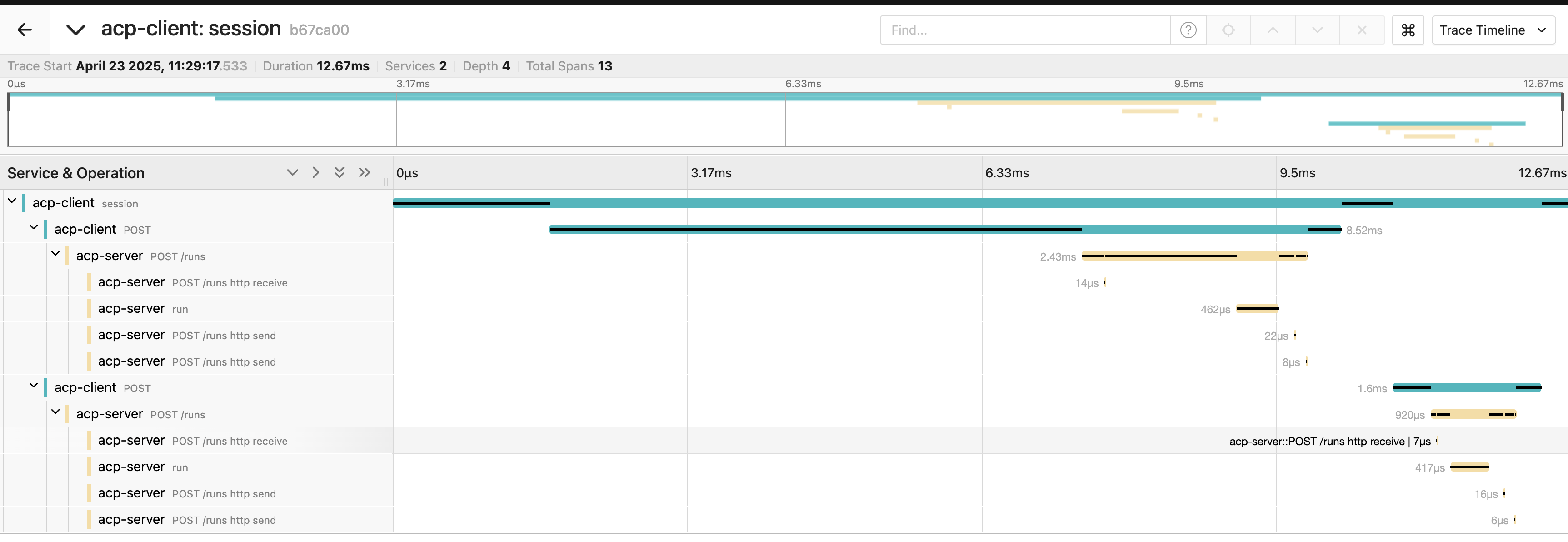
## Phonexix Example for Agent Observability
In this section, we will set up observability for the agents themselves using `Phoenix`.
Be sure you have a running Phoenix instance before you start! See the [Run Phoenix](#run-phoenix) section for more details.
### LangGraph Agent
#### Init repository
```
uv init
```
```
uv add acp-sdk==0.3.3 langgraph==0.3.31 openinference-instrumentation-langchain==0.1.41
```
#### Define Agent / Client
Define `agent.py`, `telemetry.py` and `client.py` files:
```python
from collections.abc import AsyncGenerator
from functools import reduce
from datetime import datetime
from typing import TypedDict
from openinference.instrumentation.langchain import LangChainInstrumentor
from acp_sdk.models.models import MessagePart
from acp_sdk.models import Message
from acp_sdk.server import RunYield, RunYieldResume, Server
from langchain_core.runnables import RunnableLambda
from langgraph.graph import StateGraph
LangChainInstrumentor().instrument()
class AgentState(TypedDict):
name: str
final_response: str
hour: int
greeting: str
def get_current_hour(state: AgentState):
now = datetime.now()
return {"hour": now.hour}
def decide_greeting(state: AgentState):
hour = state["hour"]
if 6 <= hour < 12:
return {"greeting": "Good morning"}
elif 12 <= hour < 18:
return {"greeting": "Good afternoon"}
else:
return {"greeting": "Good evening"}
def format_response(state: AgentState):
return {"final_response": f'{state["greeting"]} {state["name"]}'}
# create graph
workflow = StateGraph(AgentState)
# add nodes
workflow.add_node("get_time", RunnableLambda(get_current_hour))
workflow.add_node("decide_greeting", RunnableLambda(decide_greeting))
workflow.add_node("format_response", RunnableLambda(format_response))
# connect nodes
workflow.set_entry_point("get_time")
workflow.add_edge("get_time", "decide_greeting")
workflow.add_edge("decide_greeting", "format_response")
workflow.set_finish_point("format_response")
graph = workflow.compile()
server = Server()
@server.agent()
async def lang_graph_agent(input: list[Message]) -> AsyncGenerator[RunYield, RunYieldResume]:
"""LangGraph agent that greets the user based on the current time."""
query = reduce(lambda x, y: x + y, input)
output = None
async for event in graph.astream({"name": str(query)}, stream_mode="updates"):
for value in event.items():
yield {"update": value}
output = event
yield MessagePart(content=output.get("format_response", {}).get("final_response", ""), content_type="text/plain")
server.run(configure_telemetry=True)
```
```python
from opentelemetry.sdk.resources import Resource
from opentelemetry import trace
from opentelemetry.sdk.trace import TracerProvider
from opentelemetry.sdk.trace.export import BatchSpanProcessor
from opentelemetry.exporter.otlp.proto.http.trace_exporter import OTLPSpanExporter
def setup_tracer():
resource = Resource.create(attributes={
"service.name": "acp-client",
})
provider = TracerProvider(resource=resource)
processor = BatchSpanProcessor(OTLPSpanExporter())
provider.add_span_processor(processor)
trace.set_tracer_provider(provider)
```
```python
import asyncio
from acp_sdk.client import Client
from acp_sdk.models import (
Message,
MessagePart,
)
from telemetry import setup_tracer
setup_tracer()
async def client() -> None:
async with Client(base_url="http://localhost:8000") as client, client.session() as session:
run_milan = await session.run_sync(
agent="lang_graph_agent",
input=[Message(parts=[MessagePart(content="Milan", content_type="text/plain")])]
)
print(run_milan.output[0].parts[0].content)
if __name__ == "__main__":
asyncio.run(client())
```
Notice the `LangChainInstrumentor().instrument()` line when we turn on the LangChain instrumentation (LangGraph included) in the **agent.py** file.
#### Run the server
```
uv run server.py
```
#### Run the client
```
uv run client.py
```
#### Debug it
Open `http://localhost:4318/projects` in your browser and choose the **default** project.
You should see your first trace called `session`. When you click on the trace, you should see these details:
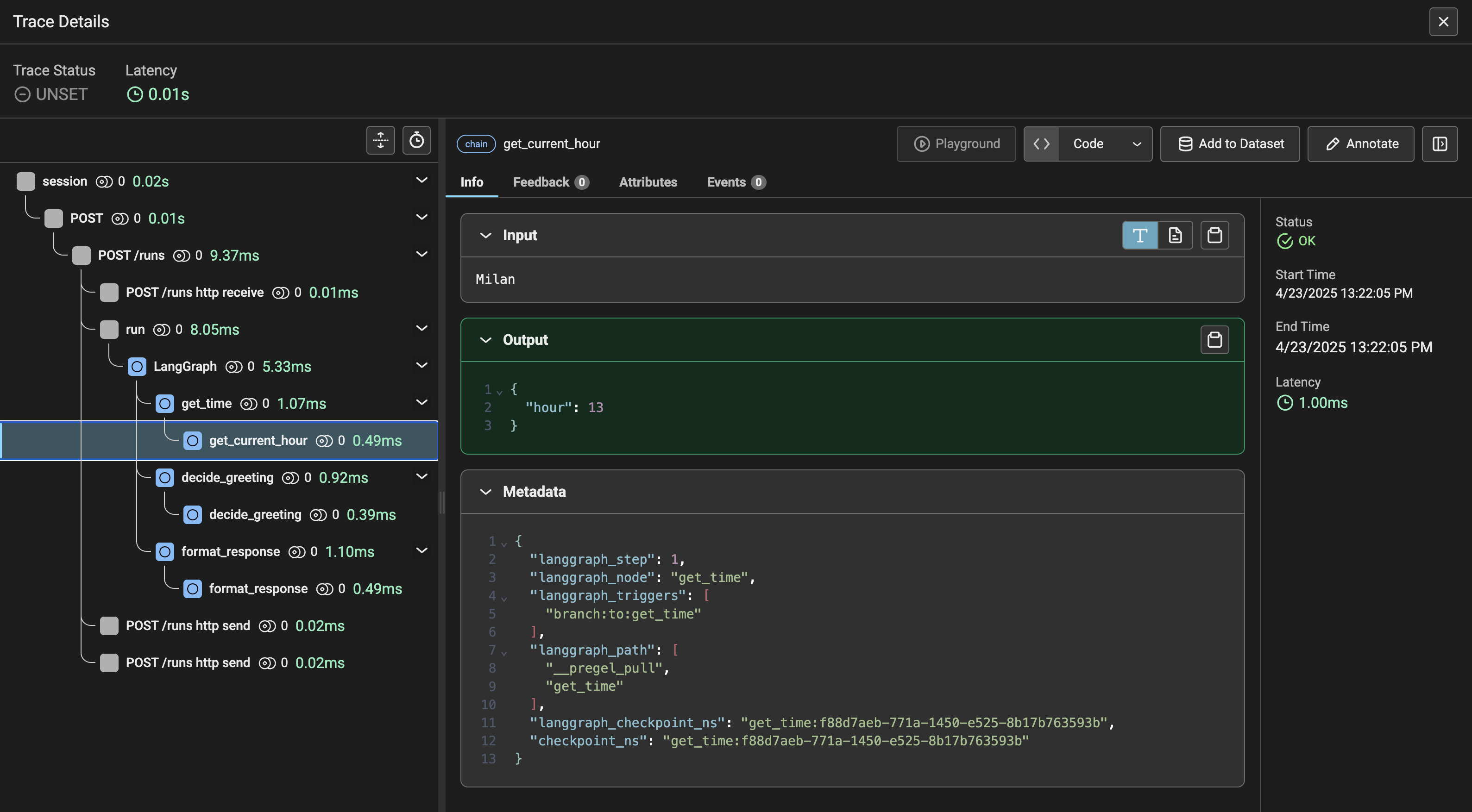
# Discover & Run Agent
Source: https://agentcommunicationprotocol.dev/how-to/discover-and-run-agent
How to discover and run ACP agents via REST and Python SDK
This guide shows how to discover available ACP agents and execute them using different modes (synchronous, asynchronous, and streaming) through both REST API and Python SDK.
## Discover available agents
Before running agents, you need to know what's available. ACP servers expose agent metadata through a discovery endpoint that lists all registered agents with their capabilities. Use REST for simple interactions or Python SDK for richer, programmatic control.
### Using REST API
Send a GET request to the `/agents` endpoint to list available agents:
```bash Request
curl http://localhost:8000/agents
```
```json Response
{
"agents": [
{ "name": "echo", "description": "Echoes everything", "metadata": {} }
]
}
```
### Using Python SDK
For programmatic access, use the Python client to discover agents:
```python
import asyncio
from acp_sdk.client import Client
async def list_agents():
async with Client(base_url="http://localhost:8000") as client:
async for agent in client.agents():
print(agent)
if __name__ == "__main__":
asyncio.run(list_agents())
```
For discovering agents across multiple servers, consider using a service registry or the [BeeAI Platform](https://beeai.dev) for centralized agent discovery.
## Run an agent
ACP supports three execution modes, each suited for different use cases:
* **Synchronous**: Best for quick operations where you need immediate results
* **Asynchronous**: Ideal for long-running tasks that you can check later
* **Streaming**: Perfect for real-time applications requiring incremental updates
### Message Format
All agent interactions use a standardized message format:
```bash
{
"role": "user",
"parts": [
{
"content_type": "text/plain",
"content": "Your message here"
}
]
}
```
Learn more about [Message Stucture](/core-concepts/message-structure).
### Synchronous execution
Synchronous execution blocks until the agent completes processing and returns the full response.
```bash Request
curl -X POST http://localhost:8000/runs \
-H "Content-Type: application/json" \
-d '{
"agent_name": "echo",
"input": [{"role": "user", "parts": [{"content": "Hello"}]}],
"mode": "sync"
}'
```
```json Response
{
"agent_name": "echo",
"status": "completed",
"output": [
{
"role": "agent/echo",
"parts": [{ "content_type": "text/plain", "content": "Hello" }]
}
]
}
```
Using Python SDK:
```python
import asyncio
from acp_sdk.client import Client
from acp_sdk.models import Message, MessagePart
async def run_sync():
async with Client(base_url="http://localhost:8000") as client:
run = await client.run_sync(
agent="echo",
input=[Message(parts=[MessagePart(content="Hello")])]
)
print(run.output)
if __name__ == "__main__":
asyncio.run(run_sync())
```
### Asynchronous execution
Asynchronous execution returns immediately with a run ID that you can use to check status and retrieve (poll) results later.
Start async execution:
```bash Request
curl -X POST http://localhost:8000/runs \
-H "Content-Type: application/json" \
-d '{
"agent_name": "echo",
"input": [{"role": "user", "parts": [{"content": "Hello"}]}],
"mode": "async"
}'
```
```json Response
{
"agent_name": "echo",
"status": "created",
"run_id": "12345678-abcd-1234-abcd-123456789abc"
}
```
Check the status/result using the returned `run_id`:
```bash
curl http://localhost:8000/runs/
```
Using Python SDK:
```python
import asyncio
from acp_sdk.client import Client
from acp_sdk.models import Message, MessagePart
async def run_async():
async with Client(base_url="http://localhost:8000") as client:
run = await client.run_async(
agent="echo",
input=[Message(parts=[MessagePart(content="Hello")])]
)
print("Run ID:", run.run_id)
# Later, retrieve results
result = await client.run_status(run_id=run.run_id)
print(result)
if __name__ == "__main__":
asyncio.run(run_async())
```
### Streaming execution
Streaming execution provides real-time updates using Server-Sent Events (SSE). Ideal for applications that need to show progress or partial results as they're generated.
```bash
curl -N -H "Accept: text/event-stream" -X POST http://localhost:8000/runs \
-H "Content-Type: application/json" \
-d '{
"agent_name": "echo",
"input": [{"role": "user", "parts": [{"content": "Hello"}]}],
"mode": "stream"
}'
```
Using Python SDK:
```python
import asyncio
from acp_sdk.client import Client
from acp_sdk.models import Message, MessagePart
async def run_stream():
async with Client(base_url="http://localhost:8000") as client:
async for event in client.run_stream(
agent="echo",
input=[Message(parts=[MessagePart(content="Hello")])]
):
print(event)
if __name__ == "__main__":
asyncio.run(run_stream())
```
# Generate Artifacts
Source: https://agentcommunicationprotocol.dev/how-to/generate-artifacts
Learn how to generate and return artifacts like images and structured data.
Artifacts are specialized message parts that represent named outputs like files, images, or structured data. Unlike regular text responses, artifacts have a `name` field that allows consuming applications to implement specific handling semantics—such as offering downloads, displaying rich content, or enabling iterative workflows.
Common use cases for artifacts include:
* **Generated files**: Reports, images, or documents created by your agent
* **Structured data**: JSON, CSV, or XML for programmatic consumption
* **Rich media**: Images, charts, or visualizations
* **Download assets**: Files that users can save locally
Refer to the [Message Structure](/core-concepts/message-structure#artifact) documentation for detailed artifact specifications.
This guide demonstrates how to generate common artifact types like images and JSON data within your ACP agent.
## Generating Image Artifacts
Agents can generate images dynamically and return them as artifacts. This example uses the Pillow (PIL) library to create a simple PNG image, encode it in base64, and yield it as an `Artifact` message part.
```python pil_image.py
import base64
import io
from collections.abc import AsyncGenerator
from acp_sdk.models import Message, Artifact
from acp_sdk.server import Context, RunYield, RunYieldResume, Server
from PIL import Image, ImageDraw
server = Server()
@server.agent()
async def pil_image_generator(
input: list[Message], context: Context
) -> AsyncGenerator[RunYield, RunYieldResume]:
"""Generates a simple PNG image using PIL and returns it."""
img = Image.new("RGB", (100, 100), color="red")
draw = ImageDraw.Draw(img)
draw.text((10, 10), "ACP Image", fill="white")
buffer = io.BytesIO()
img.save(buffer, format="PNG")
buffer.seek(0)
yield Artifact(
name="image.png",
content=base64.b64encode(buffer.read()).decode("utf-8"),
content_encoding="base64",
content_type="image/png"
)
server.run()
```
Key points:
* Images must be base64 encoded for inline transmission
* Set `content_encoding="base64"` for binary data
* Always handle potential image generation errors
* The content is saved to a `BytesIO` buffer
* An `Artifact` is yielded with `name`, `content` (base64 string), `content_encoding="base64"`, and `content_type="image/png"`.
## Generating JSON Artifacts
Agents can also return structured data, like JSON, as artifacts. This is useful for providing machine-readable output alongside or instead of human-readable text.
```python json_artifact.py
import json
from collections.abc import AsyncGenerator
from acp_sdk.models import Message, Artifact
from acp_sdk.server import Context, RunYield, RunYieldResume, Server
server = Server()
@server.agent()
async def json_artifact_generator(
input: list[Message], context: Context
) -> AsyncGenerator[RunYield, RunYieldResume]:
"""Generates a JSON artifact."""
data = {
"status": "success",
"result": {
"item_id": 123,
"description": "Sample JSON data"
}
}
yield Artifact(
name="result.json",
content=json.dumps(data, indent=2),
content_type="application/json"
)
server.run()
```
Key points:
* A Python dictionary (`data`) holds the structured information.
* `json.dumps()` converts the dictionary into a JSON string.
* An `Artifact` is yielded with `name`, `content` (the JSON string), and `content_type="application/json"`.
* The default `content_encoding` is `"plain"`, which is suitable for JSON strings.
By generating artifacts, your agents can provide rich, structured outputs beyond simple text, enabling more sophisticated interactions and integrations.
# High Availability
Source: https://agentcommunicationprotocol.dev/how-to/high-availability
Configure ACP Server for high availability deployments with centralized storage
# High Availability Setup
This guide explains how to configure ACP Server for high availability (HA) deployments using centralized storage to share server state across multiple server replicas.
## Overview
ACP Server supports high availability through centralized storage backends that enable multiple replicas to share server state. This allows you to:
* Run multiple ACP Server replicas behind a load balancer
* Ensure resilience across server restarts
* Scale horizontally for increased throughput
* Maintain state consistency across nodes
## Supported Storage Backends
ACP Server provides three storage options:
### 1. Memory Store (Default)
* **Use case**: Single-instance deployments, development
* **Limitations**: No HA support, data lost on restart, TTL expiration
* **Configuration**: Used by default, no setup required
### 2. Redis Store
* **Use case**: Production HA deployments with fast access
* **Features**: Pub/Sub notifications, automatic expiration
* **Requirements**: Redis server accessible by all ACP replicas
### 3. PostgreSQL Store
* **Use case**: Production HA deployments with persistence
* **Features**: ACID compliance, notifications via LISTEN/NOTIFY
* **Requirements**: PostgreSQL database accessible by all ACP replicas
## Configuration Examples
### Redis Store Setup
```python
from acp_sdk.server import RedisStore, Server
from redis.asyncio import Redis
# Configure Redis connection
redis = Redis(
host="your-redis-host",
port=6379,
password="your-redis-password",
)
server = Server()
# Create your agent
@server.agent()
async def my_agent(input):
# Your agent implementation
pass
# Run server with Redis store
server.run(store=RedisStore(redis=redis))
```
### PostgreSQL Store Setup
```python
from acp_sdk.server import PostgreSQLStore, Server
from psycopg import AsyncConnection
# Configure PostgreSQL connection
aconn = await AsyncConnection.connect(
"postgresql://user:password@host:5432/database",
)
server = Server()
# Create your agent
@server.agent()
async def my_agent(input):
# Your agent implementation
pass
# Run server with PostgreSQL store
server.run(
store=PostgreSQLStore(
aconn=aconn,
table="acp_store", # Optional: custom table name
channel="acp_update" # Optional: custom notification channel
)
)
```
## ACP-Specific Deployment Considerations
### Storage Backend Requirements
**Redis Requirements:**
* Redis 6.0+
* ACP will automatically configure keyspace notifications: `CONFIG SET notify-keyspace-events KEA`
**PostgreSQL Requirements:**
* PostgreSQL 12+ with LISTEN/NOTIFY support
* Database with JSONB support
* ACP will automatically create the required `acp_store` table
### Load Balancer Considerations
* **Session affinity**: Not required for ACP (sessions are centralized)
* **Health checks**: Configure to check `/ping` endpoint
* **Graceful shutdown**: ACP handles session persistence during restarts
## Environment Variables
ACP supports configuration through environment variables for storage backends:
### Redis Configuration
```bash
export REDIS_HOST=your-redis-host
export REDIS_PORT=6379
export REDIS_PASSWORD=your-redis-password
export REDIS_DB=0
```
### PostgreSQL Configuration
```bash
export POSTGRES_HOST=your-postgres-host
export POSTGRES_PORT=5432
export POSTGRES_USER=your-username
export POSTGRES_PASSWORD=your-password
export POSTGRES_DATABASE=your-database
```
## Troubleshooting
### ACP-Specific Issues
**Session not found errors**
* Verify all instances use the same storage configuration
* Check that session data exists in the centralized store
* Ensure proper authentication credentials for storage backend
**Agent state inconsistencies**
* Check storage backend connectivity from all instances
* Verify notification channels are working (Redis pub/sub, PostgreSQL LISTEN/NOTIFY)
* Review storage backend logs for connection issues
**Performance issues with centralized storage**
* Monitor storage backend performance and connection pools
* Check network latency between ACP instances and storage
* Consider storage backend-specific optimizations
### Infrastructure Issues
For Redis setup, see the [official Redis documentation](https://redis.io/docs/).\
For PostgreSQL setup, see the [official PostgreSQL documentation](https://www.postgresql.org/docs/).\
For Kubernetes deployment patterns, see the [official Kubernetes documentation](https://kubernetes.io/docs/).
For additional support, see the [production deployment guide](/core-concepts/production-grade) or visit our [GitHub discussions](https://github.com/i-am-bee/acp/discussions).
# Wrap an Agent
Source: https://agentcommunicationprotocol.dev/how-to/wrap-existing-agent
How to make an existing agent ACP-compatible
The ACP SDK allows you to wrap an existing agent, regardless of its framework or programming language, into a reusable and interoperable service. By implementing a simple interface, your agent becomes compatible with the ACP protocol and can communicate over HTTP, interact with other agents in workflows, and exchange structured messages using a shared format.
Once wrapped, your agent becomes:
* **Remotely callable** over REST APIs
* **Composable** in workflows with other agents
* **Discoverable** by other systems
* **Reusable** without changing its internal logic
## Simple agent
Install the SDK first: `uv add acp-sdk`
Wrap an agent by annotating a Python function with `@server.agent()`. The agent name comes from the function name, and the description comes from the docstring. You can add more metadata like capabilities, dependencies, and content types - see the [Agent Manifest](/core-concepts/agent-manifest) section for details.
This creates an ACP-compliant agent that can receive messages and respond via HTTP using the ACP protocol:
```python echo.py
from collections.abc import AsyncGenerator
from acp_sdk.models import Message
from acp_sdk.server import Context, RunYield, RunYieldResume, Server
# Create a new ACP server instance
server = Server()
@server.agent()
async def echo(input: list[Message], context: Context) -> AsyncGenerator[RunYield, RunYieldResume]:
"""Echoes everything"""
for message in input:
yield message
# Start the ACP server
server.run()
```
What happens here:
* The `@server.agent()` decorator registers your function as an ACP agent
* `inputs` contains the messages sent to your agent
* `context` provides request metadata and utilities
* `yield` statements send responses back to the caller
* The server automatically handles HTTP routing and message serialization
## Simple LLM agent
Here's a more sophisticated example that wraps an LLM agent with memory and tools using the `beeai-framework`:
```python llm.py
from collections.abc import AsyncGenerator
from acp_sdk.models import Message, MessagePart
from acp_sdk.server import RunYield, RunYieldResume, Server
from beeai_framework.agents.react import ReActAgent
from beeai_framework.backend.chat import ChatModel
from beeai_framework.backend.message import UserMessage
from beeai_framework.memory.token_memory import TokenMemory
server = Server()
@server.agent()
async def llm(inputs: list[Message]) -> AsyncGenerator[RunYield, RunYieldResume]:
"""LLM agent that processes inputs and returns a response"""
# Create a llm instance
llm = ChatModel.from_name("ollama:llama3.1")
# Create a memory instance
memory = TokenMemory(llm)
# Add messages to memory
for message in inputs:
await memory.add(UserMessage(str(message)))
# Create agent with memory and tools
agent = ReActAgent(llm=llm, tools=[], memory=memory)
# Run the agent with the memory
response = await agent.run()
# Yield the response
yield MessagePart(content=response.result.text)
server.run()
```
# Cursor
Source: https://agentcommunicationprotocol.dev/integrations/cursor
Integrate ACP documentation into Cursor IDE for enhanced developer assistance
Integrate the Agent Communication Protocol (ACP) documentation directly into [Cursor](https://cursor.sh/), an AI-powered IDE. Cursor’s assistant will reference ACP docs, providing helpful code suggestions as you work.
This method also works with other IDEs like VSCode, Zed, and Windsurf, etc.
## Step 1: Install Cursor
* Download and install [Cursor](https://cursor.sh/).
* Open the application.
## Step 2: Add ACP Docs to Cursor
1. Open Cursor settings.
2. Navigate to **Features → Docs**.
3. Click **"+ Add new doc"**.
4. Enter the ACP docs URL:\
`https://agentcommunicationprotocol.dev/llms-full.txt`
5. Enter a recognizable name (e.g., "ACP") and click **"Confirm"**.
Cursor will index the ACP docs automatically.
## Step 3: Use ACP Docs in Cursor
With ACP docs integrated, use Cursor’s assistant to get quick references. Start typing `@` and select your ACP documentation (based on the name you provided).
For example:
`@ACP Create a simple agent that reverses user input`
Cursor’s assistant will then provide relevant answers and code examples.
Always double-check the generated code, as it might contain inaccuracies. Good
practices include:
* Breaking tasks into smaller parts.
* Writing unit tests.
* Reviewing and understanding generated code carefully.
* Referring back to these docs to thoroughly understand the ACP protocol.
# MCP Adapter
Source: https://agentcommunicationprotocol.dev/integrations/mcp-adapter
Bridge the gap between ACP and MCP
[**Model Context Protocol (MCP)**](https://modelcontextprotocol.io/introduction) is a popular open standard from Anthropic that provides AI **models** (usually LLMs) with **context**: resources, tools and more.
Agents can be viewed as **MCP resources** and further invoked as **MCP tools**. Such look at ACP agents allows MCP clients to discover and run ACP agents at a cost of reduced interface compared to full ACP.
## Adapter
[ACP-MCP Adapter](https://github.com/i-am-bee/acp-mcp) is a production-ready **MCP server** that can be deployed in front of any **ACP server** to make the aforementioned bridging. It exposes agents as resources and defines tools to run them.
To run the adapter, there are currently two options:
1. Use PyPI package
```sh
uvx acp-mcp # e.g. http://localhost:8000
```
1. Use Docker image
```sh
docker run -i --rm ghcr.io/i-am-bee/acp-mcp # e.g. http://host.docker.internal:8000
```
The adapter currently supports [stdio transport](https://modelcontextprotocol.io/docs/concepts/transports#standard-input%2Foutput-stdio). Follow the documentation of your client to integrate one of the commands above (e.g. [Claude tutorial](https://modelcontextprotocol.io/quickstart/user)).
# Example Agents
Source: https://agentcommunicationprotocol.dev/introduction/example-agents
Explore reference agent implementations
Each example demonstrates how to expose agents built with various AI frameworks and functionality through ACP, preserving their specialized capabilities while leveraging ACP's standardized communication interface.
## Basic Server and Client Examples
A collection of standalone implementations of the various types of ACP clients and servers.
[GitHub](https://github.com/i-am-bee/acp/tree/main/examples/python/basic).
## Chat Agent with Tools, Memory, and Structured Output
Integrates the [BeeAI framework's](https://github.com/i-am-bee/beeai-framework) ReAct agent architecture with ACP by mapping BeeAI events to ACP protocol messages. This enables tool-based reasoning steps and structured final outputs within ACP.
[GitHub](https://github.com/i-am-bee/acp/tree/main/examples/python/beeai-chat).
## Slack Agent using MCP
This example demonstrates an implementation of an ACP-compatible Slack Agent using the [BeeAI framework](https://github.com/i-am-bee/beeai-framework). It leverages the framework's tool-calling agent and integrates with the MCP Server for Slack API, enabling activities on Slack via the Agent Communication Protocol (ACP).
[GitHub](https://github.com/i-am-bee/acp/tree/main/examples/python/beeai-slack-mcp).
## RAG LlamaIndex Agent
Demonstrates how to integrate a Retrieval-Augmented Generation (RAG) agent built with [LlamaIndex](https://www.llamaindex.ai/) into ACP. This example shows how to leverage LlamaIndex for document retrieval and synthesis, exposing its capabilities through ACP's standardized interface.
[GitHub](https://github.com/i-am-bee/acp/tree/main/examples/python/llama-index-rag).
## Prompt-Chaining
Implementation of prompt chaining pattern using the ACP SDK and [BeeAI framework](https://github.com/i-am-bee/beeai-framework). In this system, a main agent chains two ReAct agents: the first agent generates marketing copy for a product, and then another agent translates this marketing copy into Spanish. This setup showcases how multiple agents can be chained together within ACP.
[GitHub](https://github.com/i-am-bee/acp/tree/main/examples/python/beeai-prompt-chaining).
## Dynamic Routing
Demonstrates a translation system using [BeeAI framework's](https://github.com/i-am-bee/beeai-framework) ReAct agent with ACP. In this example, a router agent efficiently routes translation requests to specialized agents for Spanish or French translations using the TranslationTool. Exhibits the handling of multilingual translations and the conversion of these translations into structured ACP messages.
[GitHub](https://github.com/i-am-bee/acp/tree/main/examples/python/beeai-routing).
## Handoff Pattern
Ilustrates a multi agent handoff system, using the [BeeAI framework's](https://github.com/i-am-bee/beeai-framework) ReAct agent architecture with ACP. Based on the input language, the main agent delegates tasks to specialized agents for Spanish and English responses using the HandoffTool. This setup allows for flexible and handling of multilingual inputs via ACP.
[GitHub](https://github.com/i-am-bee/acp/tree/main/examples/python/beeai-handoff).
## Chat Agent with Canvas
Another example using [BeeAI framework](https://github.com/i-am-bee/beeai-framework), this time directly calling an LLM and employing a custom logic for parsing the output. It utilizes the ACP's artifact functionality to include generated files in responses, allowing the user to iterate over the generated files.
[GitHub](https://github.com/i-am-bee/acp/tree/main/examples/python/beeai-canvas).
## CrewAI Song Writer
A reference implementation of a Crew using [crew.ai](https://www.crewai.com/), exposed via ACP. This Crew generates a song based on a website provided by the user, showcasing collaborative agent behavior exposed as a unit via ACP.
[GitHub](https://github.com/i-am-bee/acp/tree/main/examples/python/crewai-song-writer).
## GPT Researcher
Integrates GPT Researcher with ACP using a custom handler that transforms outputs into structured ACP messages. This allows real-time progress updates throughout research tasks, enhancing transparency and control.
[GitHub](https://github.com/i-am-bee/acp/tree/main/examples/python/gpt-researcher).
## LangGraph Greeting Agent
An example of a [LangGraph](https://langchain-ai.github.io/langgraph/) agent that returns a time-of-day specific greeting based on a provided name. This demonstrates how LangGraph can enable context-aware, responsive agents within ACP.
[GitHub](https://github.com/i-am-bee/acp/tree/main/examples/python/langgraph-greeting).
## ACP Dynamic Agent Generator
This example demonstrates how to create an agent that dynamically generates other agents using the Agent Communication Protocol (ACP).
[GitHub](https://github.com/i-am-bee/acp/tree/main/examples/python/acp-agent-generator).
## OpenAI Story Writer
This example showcases a story writer agent built using the [OpenAI Agent Framework](https://platform.openai.com/docs/guides/agents), fully compatible with the Agent Communication Protocol (ACP). It takes user prompts and generates imaginative short stories, demonstrating how to integrate OpenAI Agents into ACP system.
[GitHub](https://github.com/i-am-bee/acp/tree/main/examples/python/openai-story-writer).
# Quickstart
Source: https://agentcommunicationprotocol.dev/introduction/quickstart
Get up and running with ACP
## 🚀 IMPORTANT UPDATE
**ACP is now part of A2A under the Linux Foundation!**
👉 [Learn more](https://github.com/orgs/i-am-bee/discussions/5) | 🛠️ [Migration Guide](https://github.com/i-am-bee/beeai-platform/blob/main/docs/community-and-support/acp-a2a-migration-guide.mdx)
This guide will walk you through using the Agent Communication Protocol (ACP) to create and run your first agent, interact with it using HTTP requests, and build a basic client.
This guide uses `uv`. See the [`uv` primer](/introduction/uv-primer) for more
details.
```sh
uv init --python '>=3.11' my_acp_project
cd my_acp_project
```
```sh
uv add acp-sdk
```
Let's create a simple "echo agent" that returns any message it receives.
Create an `agent.py` file in your project directory with the following code:
```python agent.py
import asyncio
from collections.abc import AsyncGenerator
from acp_sdk.models import Message
from acp_sdk.server import Context, RunYield, RunYieldResume, Server
server = Server()
@server.agent()
async def echo(
input: list[Message], context: Context
) -> AsyncGenerator[RunYield, RunYieldResume]:
"""Echoes everything"""
for message in input:
await asyncio.sleep(0.5)
yield {"thought": "I should echo everything"}
await asyncio.sleep(0.5)
yield message
server.run()
```
```sh
uv run agent.py
```
Your server should now be running at [http://localhost:8000](http://localhost:8000).
In another terminal, run the following `curl` command:
```sh Request
curl http://localhost:8000/agents
```
```json Response
{
"agents": [
{ "name": "echo", "description": "Echoes everything", "metadata": {} }
]
}
```
You should see a JSON response containing your `echo` agent, confirming it's available.
```sh Request
curl -X POST http://localhost:8000/runs \
-H "Content-Type: application/json" \
-d '{
"agent_name": "echo",
"input": [
{
"role": "user",
"parts": [
{
"content": "Howdy!",
"content_type": "text/plain"
}
]
}
]
}'
```
```json Response
{
"run_id": "44e480d6-9a3e-4e35-8a03-faa759e19588",
"agent_name": "echo",
"session_id": "b30b1946-6010-4974-bd35-89a2bb0ce844",
"status": "completed",
"await_request": null,
"output": [
{
"role": "agent/echo",
"parts": [
{
"name": null,
"content_type": "text/plain",
"content": "Howdy!",
"content_encoding": "plain",
"content_url": null
}
]
}
],
"error": null
}
```
Your response should include the echoed message "Howdy!".
Here's a simple ACP client to interact with your `echo` agent.
Create a `client.py` file in your project directory with the following code:
```python client.py
import asyncio
from acp_sdk.client import Client
from acp_sdk.models import Message, MessagePart
async def example() -> None:
async with Client(base_url="http://localhost:8000") as client:
run = await client.run_sync(
agent="echo",
input=[
Message(
parts=[MessagePart(content="Howdy to echo from client!", content_type="text/plain")]
)
],
)
print(run.output)
if __name__ == "__main__":
asyncio.run(example())
```
```sh
uv run client.py
```
You should see the echoed response printed to your console. 🎉
Now that you're up and running, explore [Example Agents](/introduction/example-agents), [Core Concepts](/core-concepts), or browse the full [API Reference](/spec/agents-list).
# Welcome
Source: https://agentcommunicationprotocol.dev/introduction/welcome
Get to know the Agent Communication Protocol
## 🚀 IMPORTANT UPDATE
**ACP is now part of A2A under the Linux Foundation!**
👉 [Learn more](https://github.com/orgs/i-am-bee/discussions/5) | 🛠️ [Migration Guide](https://github.com/i-am-bee/beeai-platform/blob/main/docs/community-and-support/acp-a2a-migration-guide.mdx)
## What is ACP?
The **Agent Communication Protocol (ACP)** is an open protocol for agent interoperability that solves the growing challenge of connecting AI agents, applications, and humans.
Modern AI agents are often built in isolation, across different frameworks, teams, and infrastructures. This fragmentation slows innovation and makes it harder for agents to work together effectively. ACP solves this by enabling agents to communicate through a standardized RESTful API that supports:
* All forms of modality
* Synchronous and asynchronous communication
* Streaming interactions
* Both stateful and stateless operation patterns
* Online and offline agent discovery
* Long running tasks
The protocol remains agnostic to internal implementations, requiring only minimal specifications for compatibility. Whether your agent is built with the [BeeAI framework](http://framework.beeai.dev/), LangChain, CrewAI, or custom code, ACP provides the bridge for seamless collaboration.
While you can integrate ACP agents directly into your own applications, ACP also underpins the [BeeAI platform](https://docs.beeai.dev) - a project that allows you to test, deploy, and share ACP agents with your team.
## Why ACP?
AI systems today are fragmented across incompatible frameworks, creating:
* Integration barriers - Connecting different agents requires custom solutions
* Duplicated effort - Teams rebuild similar functionality
* Scalability challenges - Point-to-point integrations don't scale
* Inconsistent developer experience - Each framework has its own patterns
ACP addresses these challenges by providing a shared communication standard that works across any technology stack. **Developed as an open standard under the Linux Foundation** alongside BeeAI (its reference implementation), ACP maintains transparent, community-driven governance to ensure the protocol serves the broader ecosystem rather than any single vendor.
## Use Cases Enabled by ACP
ACP unlocks powerful scenarios that transform how agents work together:
**Flexible Agent Replacement** As AI technology rapidly evolves, the best-performing agent changes frequently. ACP compatibility lets you seamlessly swap agents in production systems, even when built with different frameworks. Upgrade your translation agent from a custom model to the latest LLM, or replace your code generation tool with a specialized coding assistant - all without modifying integration points.
**Multi-Agent Collaboration** Build sophisticated systems where specialized agents work as coordinated teams. A content creation workflow might involve a topic research agent gathering information, a writing agent crafting the draft, and an SEO optimization agent refining for search performance. Each agent excels in its domain while seamlessly coordinating through standardized handoffs.
**Cross-Platform Integration** Connect agents across your technology stack - marketing automation, analytics platforms, development tools, and communication systems. When your monitoring agent detects a performance issue, it can automatically trigger your incident response agent to create tickets, notify teams, and coordinate with deployment systems to roll back changes.
**Inter-Company Partnerships** Enable secure agent collaboration between organizations. A logistics company's routing agent could work with a supplier's inventory agent to optimize delivery schedules, or a marketing agency's campaign agent could coordinate with a client's approval workflow agent for streamlined content reviews across organizational boundaries.
By creating a universal foundation for agent communication, ACP drives broader AI adoption and enables more powerful, interconnected intelligent systems across industries.
## Key Features
* **REST-based Communication:** ACP uses simple, well-defined [REST endpoints](/spec/agents-list) that align with standard HTTP patterns. Unlike protocols requiring specialized communication methods (such as JSON-RPC), ACP leverages familiar HTTP conventions that integrate seamlessly into production environments.
* **Support for All Message Types:** ACP uses MimeTypes for content identification, making it easily extensible to handle any data format. Whether you're sending text, images, audio, video, or custom binary formats, any mimetype works out of the box without protocol modifications.
* **No SDK Required (but available):** The protocol is simple enough to use with standard HTTP tools like curl, Postman, or browser requests. For teams that prefer to integrate ACP programmatically, an official [Python SDK](https://github.com/i-am-bee/acp/tree/main/python) and [Typescript SDK](https://github.com/i-am-bee/acp/tree/main/typescript) is available.
* **Offline Discovery:** Agents can be made discoverable even when inactive by embedding metadata directly into their distribution packages. This enables discovery in secure, disconnected, or scale-to-zero environments.
* **Async-first, Sync Supported:** Built primarily for asynchronous communication to handle long-running agent tasks, while fully supporting synchronous communication.
## Get Started
Get up and running with ACP in minutes
Explore reference agent implementations
View the complete OpenAPI specification
Tools for building and consuming ACP agents
# What's New
Source: https://agentcommunicationprotocol.dev/introduction/whats-new
Latest features and improvements in ACP
* **🧭 [Trajectory Metadata](/core-concepts/message-metadata#trajectory-metadata)** – Enhanced MessagePart with TrajectoryMetadata for improved tracking of multi-step reasoning and tool usage. Enables agents to expose their internal reasoning paths, tool invocation chains, and state transitions across a conversation, supporting advanced debugging and interpretability workflows.
* **🌐 [Distributed Sessions](/core-concepts/distributed-sessions)** - Session continuity across multiple server instances using URI-based resource sharing. This enables agents to maintain conversation history and state even when requests are handled by different server nodes, without requiring centralized storage infrastructure.
* **🔍 [RAG LlamaIndex Agent](https://github.com/i-am-bee/acp/tree/main/examples/python/llama-index-rag)** - New example agent demonstrating Retrieval-Augmented Generation (RAG) using LlamaIndex. Shows how to build knowledge-based agents that can query external documents and provide contextually relevant responses.
* **📚 [Citation Metadata](/core-concepts/message-metadata#citation-metadata)** - Enhanced MessagePart with CitationMetadata for improved source tracking and attribution. Enables agents to provide transparent references to their information sources, improving trustworthiness and enabling fact-checking workflows.
* **⚡ [High Availability Support](/how-to/high-availability)** - Deploy ACP servers with centralized storage backends (Redis/PostgreSQL) for scalable, fault-tolerant setups. Enables production deployments with multiple server instances, load balancing, and automatic failover capabilities.
* **📝 [Message Role Parameter](/core-concepts/message-structure)** - Added `role` parameter to Message structure for better agent identification. Supports `user`, `agent`, and `agent/{name}` formats, enabling clearer conversation tracking and multi-agent coordination.
* **🔄 [TypeScript SDK (Client)](https://github.com/i-am-bee/acp/tree/main/typescript)** - Full TypeScript client library for interacting with ACP agents. Provides type-safe client implementations with comprehensive support for all ACP operations including sessions, runs, and streaming.
## Get Involved
ACP is an open-source project and we welcome contributions! Whether you're reporting bugs, suggesting features, or contributing code, check out our [contribution guidelines](/about/contribute) to get started.
# Agent Manifest
Source: https://agentcommunicationprotocol.dev/spec/agents-get
GET /agents/{name}
Returns a manifest of the specified agent.
# Agent Discovery
Source: https://agentcommunicationprotocol.dev/spec/agents-list
GET /agents
Returns a list of agents.
# OpenAPI Spec
Source: https://agentcommunicationprotocol.dev/spec/openapi
# Ping
Source: https://agentcommunicationprotocol.dev/spec/ping
GET /ping
Returns a ping.
# Cancel a run
Source: https://agentcommunicationprotocol.dev/spec/run-cancel
POST /runs/{run_id}/cancel
Cancel the specified run.
# Create a new run
Source: https://agentcommunicationprotocol.dev/spec/run-create
POST /runs
Create and start a new run for the specified agent.
# Get run status
Source: https://agentcommunicationprotocol.dev/spec/run-get
GET /runs/{run_id}
Returns the current status and details of a run.
# List run events
Source: https://agentcommunicationprotocol.dev/spec/run-get-events
GET /runs/{run_id}/events
Returns a list of events emitted by the run.
# Resume a run
Source: https://agentcommunicationprotocol.dev/spec/run-resume
POST /runs/{run_id}
Resume a paused or awaiting run.
# null
Source: https://agentcommunicationprotocol.dev/spec/sessions-get
GET /sessions/{session_id}